Psql Tip #001
If you want to simply send a single line command to psql and
exit, try using the
-c or
--command=command flag.
laetitia:~$ psql -c 'select * from test;'
 id | value
----+-------
  1 | test
(1 row)Psql Tip #002
You can combine several
-c or
--command=command flags to execute several
commands or queries.
laetitia:~$ psql -c 'select count(*) from test;' -c 'select
* from test;'
 count
-------
     1
(1 row)

 id | value
----+-------
  1 | test
(1 row)Psql Tip #003
With the
--csv flag, psql will display the
result as a csv file.
psql --csv -c 'select * from test;'
id,value
1,testPsql Tip #004
The
-E or --echo-hidden will
display the actual query generated by backslash commands. It
is a great way to learn Postgres and psql internals.
laetitia:~$ psql -E -c '\l'
********* QUERY **********
SELECT d.datname as "Name",
       pg_catalog.pg_get_userbyid(d.datdba) as "Owner",
       pg_catalog.pg_encoding_to_char(d.encoding) as "Encoding",
       d.datcollate as "Collate",
       d.datctype as "Ctype",
       pg_catalog.array_to_string(d.datacl, E'\n') AS "Access privileges"
FROM pg_catalog.pg_database d
ORDER BY 1;
**************************

                                  List of databases
   Name    |  Owner   | Encoding |   Collate   |    Ctype    |   Access privileges
-----------+----------+----------+-------------+-------------+-----------------------
 laetitia  | laetitia | UTF8     | en_US.UTF-8 | en_US.UTF-8 |
 postgres  | postgres | UTF8     | en_US.UTF-8 | en_US.UTF-8 |
 template0 | postgres | UTF8     | en_US.UTF-8 | en_US.UTF-8 | =c/postgres          +
           |          |          |             |             | postgres=CTc/postgres
 template1 | postgres | UTF8     | en_US.UTF-8 | en_US.UTF-8 | =c/postgres          +
           |          |          |             |             | postgres=CTc/postgres
 test      | postgres | UTF8     | en_US.UTF-8 | en_US.UTF-8 |
(5 rows)Psql Tip #005
Use
-f filename or --file=filename
to play queries from a file.
laetitia:~$ cat query.sql
select * from test;
laetitia:~$ psql -f query.sql
 id | value
----+-------
  1 | test
(1 row)Psql Tip #006
You can combine the
-c or --command
flag with the -f or --file flag.
laetitia:~$ cat query.sql
select * from test;
laetitia:~$ psql -f query.sql -c 'select count(*) from test;'
 id | value
----+-------
  1 | test
(1 row)

 count
-------
     1
(1 row)Psql Tip #007
If you use the value
- (hyphen) in the flag
-f or --filename, psql will read
commands and queries from the standard input. The read will
end when reaching EOF command (CTRL+D) or the \q
command.
laetitia:~$ psql -f -
laetitia=# select * from test; \q
 id | value
----+-------
  1 | test
(1 row) Psql Tip #008
Using the
-f or --filename flag
will allow to get useful information as error messages with
line numbers.
laetitia:~$ cat query.sql
select count(*) from test;

test;

select * from test;
laetitia:~$ psql -f query.sql
 count
-------
     1
(1 row)

psql:query.sql:3: ERROR:  syntax error at or near "test"
LINE 1: test;
        ^
 id | value
----+-------
  1 | test
(1 row)Psql Tip #009
You can give queries to psql from the standard input using
< filename.
laetitia:~$ cat query.sql
select * from test;
laetitia:~$ psql < query.sql
 id | value
----+-------
  1 | test
(1 row)Psql Tip #010
You can use the result of another command as an input for
psql using the
| character.
laetitia:~$ cat query.sql
select * from test;
laetitia:~$ cat query.sql | psql
 id | value
----+-------
  1 | test
(1 row)Psql Tip #011
-d dbname or --dbname=dbname will
allow you to specify the name of the database psql needs to
connect to.
laetitia:~$ psql -d laetitia
psql (14devel)
Type "help" for help.

laetitia=# Psql Tip #012
The remaining word after option processing will be taken as a
database name.
laetitia:~$ psql test
psql (14devel)
Type "help" for help.

test=# Psql Tip #013
The
See Postgres documentation for connection URIs.
-d sometext or
--dbname=sometext can accept a connection URI
instead of a dbname.See Postgres documentation for connection URIs.
laetitia:~$ psql -d postgresql://localhost
psql (14devel)
Type "help" for help.

laetitia=# Psql Tip #014
The
See Postgres documentation for Keyword/Value connection strings.
-d sometext or
--dbname=sometext can accept a Keyword/Value
connection string instead of a dbname.See Postgres documentation for Keyword/Value connection strings.
laetitia:~$ psql -d "host=localhost port=5432"
psql (14devel)
Type "help" for help.

laetitia=# Psql Tip #015
The database psql will try to connect to is in order:
- the database name provided with the
-dor--dbnameflag - the first parameter not linked to a flag if the
-dor--dbnameis not set - the value of the $PGDATABASE environment variable, if set
- the same as the name of the user who's trying to connect
laetitia:~$ psql -d test
psql (14devel)
Type "help" for help.

test=# \q
laetitia:~$ psql test
psql (14devel)
Type "help" for help.

test=# \q
laetitia:~$ export PGDATABASE=test
laetitia:~$ psql
psql (14devel)
Type "help" for help.

test=# \q
laetitia:~$ unset PGDATABASE
laetitia:~$ psql
psql (14devel)
Type "help" for help.

laetitia=#Psql Tip #016
Using the
-e or --echo-queries will
display the query just before the query result in the
standard output.
laetitia:~$ psql -e -c 'select * from test;'
select * from test;
 id | value
----+-------
  1 | test
(1 row)Psql Tip #017
Using twice a
-c or --command flag
will display the result of both commands whereas feeding a
string with two queries to a -c or
--command flag will only display the result of
the last one.
laetitia:~$ psql -c 'select count(*) from test; select * from test;'
 id | value
----+-------
  1 | test
(1 row)

laetitia:~$ psql -c 'select count(*) from test;' -c ' select * from test;'
 count
-------
     1
(1 row)

 id | value
----+-------
  1 | test
(1 row) Psql Tip #018
The
-h hostname or --hostname
hostname flag will allow you to provide a host psql
will connect to.
laetitia:~$ psql -h localhost
psql (14devel)
Type "help" for help.

laetitia=#Psql Tip #019
You can use the
-h hostname or --hostname
hostname flag to provide the directory the server is
writing the into, instead of providing a hostname.
laetitia:~$ sudo grep unix_socket_directories /usr/local/pgsql/data/postgresql.conf
unix_socket_directories = '/tmp'       # comma-separated list of directories
laetitia:~$ psql -h /tmp
psql (14devel)
Type "help" for help.

laetitia=# \qPsql Tip #020
The host psql will try to connect to is in order:
- The hostname/socket directory provided by the
-cor--command - The $PGHOST environment variable, if set
- The Unix-domain socket used by the local Postgres server (if supported)
localhostif Unix-domain socket are not supported
laetitia:~$ psql -h localhost
psql (14devel)
Type "help" for help.

laetitia=# \conninfo
You are connected to database "laetitia" as user "laetitia" on host "localhost" (address "::1") at port "5432".
laetitia=# \q
laetitia:~$ psql -h /tmp
psql (14devel)
Type "help" for help.

laetitia=# \conninfo
You are connected to database "laetitia" as user "laetitia" via socket in "/tmp" at port "5432".
laetitia=# \q
laetitia:~$ export PGHOST=localhost
laetitia:~$ psql
psql (14devel)
Type "help" for help.

laetitia=# \conninfo
You are connected to database "laetitia" as user "laetitia" on host "localhost" (address "::1") at port "5432".
laetitia=# \q
laetitia:~$ unset PGHOST
laetitia:~$ psql
psql (14devel)
Type "help" for help.

laetitia=# \conninfo
You are connected to database "laetitia" as user "laetitia" via socket in "/tmp" at port "5432".
laetitia=# \qPsql Tip #021
Use the
-H or --html flag to get
the query result in HTML format.
laetitia:~$ psql -H -c 'select * from test;'
<table border="1">
  <tr>
    <th align="center">id</th>
    <th align="center">value</th>
  </tr>
  <tr valign="top">
    <td align="right">1</td>
    <td align="left">test</td>
  </tr>
</table>
<p>(1 row)<br />
</p>Psql Tip #022
The
-l or --list flag will list the
databases available on the server.
laetitia:~$ psql -l
                                  List of databases
   Name    |  Owner   | Encoding |   Collate   |    Ctype    |   Access privileges
-----------+----------+----------+-------------+-------------+-----------------------
 laetitia  | laetitia | UTF8     | en_US.UTF-8 | en_US.UTF-8 |
 postgres  | postgres | UTF8     | en_US.UTF-8 | en_US.UTF-8 |
 template0 | postgres | UTF8     | en_US.UTF-8 | en_US.UTF-8 | =c/postgres          +
           |          |          |             |             | postgres=CTc/postgres
 template1 | postgres | UTF8     | en_US.UTF-8 | en_US.UTF-8 | =c/postgres          +
           |          |          |             |             | postgres=CTc/postgres
 test      | postgres | UTF8     | en_US.UTF-8 | en_US.UTF-8 |
(5 rows)Psql Tip #023
Unless a databasename is given, using the
-l or
--list flag will make psql attempt to connect to
the postgres database.
laetitia:~$ sudo cat /usr/local/pgsql/data/pg_hba.conf
# TYPE  DATABASE        USER            ADDRESS                 METHOD

local   postgres       laetitia                                 reject
# "local" is for Unix domain socket connections only
local   all             all                                     trust
# IPv4 local connections:
host    all             all             127.0.0.1/32            trust
# IPv6 local connections:
host    all             all             ::1/128                 trust
# Allow replication connections from localhost, by a user with the
# replication privilege.
local   replication     all                                     trust
host    replication     all             127.0.0.1/32            trust
host    replication     all             ::1/128                 trust
laetitia:~$ psql -l
psql: error: connection to server on socket "/tmp/.s.PGSQL.5432" failed: FATAL:  pg_hba.conf rejects connection for host "[local]", user "laetitia", database "postgres", no encryption
laetitia:~$ psql -l laetitia
                                  List of databases
   Name    |  Owner   | Encoding |   Collate   |    Ctype    |   Access privileges
-----------+----------+----------+-------------+-------------+-----------------------
 laetitia  | laetitia | UTF8     | en_US.UTF-8 | en_US.UTF-8 |
 postgres  | postgres | UTF8     | en_US.UTF-8 | en_US.UTF-8 |
 template0 | postgres | UTF8     | en_US.UTF-8 | en_US.UTF-8 | =c/postgres          +
           |          |          |             |             | postgres=CTc/postgres
 template1 | postgres | UTF8     | en_US.UTF-8 | en_US.UTF-8 | =c/postgres          +
           |          |          |             |             | postgres=CTc/postgres
 test      | postgres | UTF8     | en_US.UTF-8 | en_US.UTF-8 |
(5 rows)Psql Tip #024
If you use the
-l or --list flag,
all the other options provided (except the database name
option) won't be taken into account.
laetitia:~$ psql -l -c 'select * from test;' laetitia
                                  List of databases
   Name    |  Owner   | Encoding |   Collate   |    Ctype    |   Access privileges
-----------+----------+----------+-------------+-------------+-----------------------
 laetitia  | laetitia | UTF8     | en_US.UTF-8 | en_US.UTF-8 |
 postgres  | postgres | UTF8     | en_US.UTF-8 | en_US.UTF-8 |
 template0 | postgres | UTF8     | en_US.UTF-8 | en_US.UTF-8 | =c/postgres          +
           |          |          |             |             | postgres=CTc/postgres
 template1 | postgres | UTF8     | en_US.UTF-8 | en_US.UTF-8 | =c/postgres          +
           |          |          |             |             | postgres=CTc/postgres
 test      | postgres | UTF8     | en_US.UTF-8 | en_US.UTF-8 |
(5 rows)Psql Tip #025
The flag
-a or --echo-all will
print all the non empty lines to the standard output.
laetitia:~$ cat query.sql
select count(*) from test;


select * from test;
laetitia:~$ psql -f query.sql -a
select count(*) from test;
 count
-------
     1
(1 row)

select * from test;
 id | value
----+-------
  1 | test
(1 row)Psql Tip #026
The
-L filename or
--log-file=filename flag will write all query
output into file filename in addition to the normal output
destination.
laetitia:~$ psql -c 'select * from test;' -L output.log
 id | value
----+-------
  1 | test
(1 row)

laetitia:~$ cat output.log
********* QUERY **********
select * from test;
**************************

 id | value
----+-------
  1 | test
(1 row)Psql Tip #027
The
-o filename or
--output=filename flag will write all query
output into file filename.
laetitia:~$ psql -c 'select * from test;' -o output.log
laetitia:~$ cat output.log
 id | value
----+-------
  1 | test
(1 row)Psql Tip #028
The
-p port or --port=port will
allow you to use a specific port number to connect.
laetitia:~$ psql -p 5432
psql (14devel)
Type "help" for help.

laetitia=#Psql Tip #029
The port psql will try to connect to is in order:
- the port provided with the
-por--portflag - the value of the $PGPORT environment variable, if set
- The port specified at compile time (usually 5432)
laetitia:~$ sudo grep "port =" /usr/local/pgsql/data/postgresql.conf
port = 5433                             # (change requires restart)
laetitia:~$ psql -p 5433
psql (14devel)
Type "help" for help.

laetitia=# \q
laetitia:~$ export PGPORT=5433
laetitia:~$ psql
psql (14devel)
Type "help" for help.

laetitia=# \q
laetitia:~$ unset PGPORT
laetitia:~$ psql
psql: error: connection to server on socket "/tmp/.s.PGSQL.5432" failed: No such file or directory
Is the server running locally and accepting connections on that socket?Psql Tip #030
psql will be more quiet with the
-q or
--quiet flag on.
laetitia:~$ psql
psql (14devel)
Type "help" for help.

laetitia=# \q
laetitia:~$ psql -q
laetitia=# \qPsql Tip #031
If you want to debug a script, the
-s or
--single-step flag will make psql stop after
each command.
laetitia:~$ cat query.sql
select count(*) from test;
select * from test;
laetitia:~$ psql -s -f query.sql
***(Single step mode: verify command)*******************************************
select count(*) from test;
***(press return to proceed or enter x and return to cancel)********************

 count
-------
     1
(1 row)

***(Single step mode: verify command)*******************************************
select * from test;
***(press return to proceed or enter x and return to cancel)********************

 id | value
----+-------
  1 | test
(1 row)Psql Tip #032
The
-t or --tuples-only flag will
turn off printing column names and result row count footers.
laetitia:~$ psql -c 'select * from test;'
 id | value
----+-------
  1 | test
(1 row)

laetitia:~$ psql -c 'select * from test;' -t
1 | testPsql Tip #033
If you want to display the result of your query in HTML,
using the
-T table_options or --table-attr
table_options will allow you to specify options in the
HTML table tag.
laetitia:~$ psql -c 'select * from test;' -H -T class=\"myAwesomeTableClass\"
<table border="1" class="myAwesomeTableClass">
  <tr>
    <th align="center">id</th>
    <th align="center">value</th>
  </tr>
  <tr valign="top">
    <td align="right">1</td>
    <td align="left">test</td>
  </tr>
</table>
<p>(1 row)<br />
</p>Psql Tip #034
The
-U username or
--username=username flag will allow you to feed
the database user to connect to to psql.
laetitia:~$ psql -U postgres
psql (14devel)
Type "help" for help.

postgres=#
Psql Tip #035
The user psql will try to connect with is in order:
- the user provided with the
-U usernameor--username=username - the value of the $PGUSER environment variable, if set
- the name of the OS user
laetitia:~$ psql -U postgres
psql (14devel)
Type "help" for help.

postgres=# \conninfo
You are connected to database "postgres" as user "postgres" via socket in "/tmp" at port "5432".
postgres=# \q
laetitia:~$ export PGUSER=postgres
laetitia:~$ psql
psql (14devel)
Type "help" for help.

postgres=# \conninfo
You are connected to database "postgres" as user "postgres" via socket in "/tmp" at port "5432".
postgres=# \q
laetitia:~$ unset PGUSER
laetitia:~$ psql
psql (14devel)
Type "help" for help.

laetitia=# \conninfo
You are connected to database "laetitia" as user "laetitia" via socket in "/tmp" at port "5432".Psql Tip #036
Long options can take a value with or without the equal sign.
laetitia:~$ psql --dbname laetitia
psql (14devel)
Type "help" for help.

laetitia=# \q
laetitia:~$ psql --dbname=laetitia
psql (14devel)
Type "help" for help.

laetitia=#Psql Tip #037
You can use variables in psql in non-interactive mode. the
flag
-v assignment or
--set=assignment or
--variable=assignment.
laetitia:~$ cat query.sql
select * from :tablename;
laetitia:~$ psql -v tablename=test -f query.sql
 id | value
----+-------
  1 | test
(1 row)

laetitia:~$ cat query2.sql
select * from test where value = :'var';
ilaetitia:~$ psql --set var=test -f query2.sql
 id | value
----+-------
  1 | test
(1 row)Psql Tip #038
To unset a variable or to set a variable to an empty value in
non interractive mode, use the
-v assignment or
--set=assignment or
--variable=assignment flag and leave off the
equal sign.
laetitia:~$ psql -v var=value -c '\echo :var'
value
laetitia:~$ psql -v var= -c '\echo :var' Psql Tip #039
psql will print the psql version and exit should you use the
-V or --version flag.
laetitia:~$ psql -V
psql (PostgreSQL) 14develPsql Tip #040
If you don't want psql to issue a password prompt, use the
-w or --no-password flag. Should a
password be needed, the connection attemp will fail. This is
useful in batch jobs and scripts where no user is present to
enter a password.
laetitia:~$ sudo cat /usr/local/pgsql/data/pg_hba.conf
# TYPE  DATABASE        USER            ADDRESS                 METHOD

local   postgres       laetitia                                 scram-sha-256
# "local" is for Unix domain socket connections only
local   all             all                                     trust
# IPv4 local connections:
host    all             all             127.0.0.1/32            trust
# IPv6 local connections:
host    all             all             ::1/128                 trust
# Allow replication connections from localhost, by a user with the
# replication privilege.
local   replication     all                                     trust
host    replication     all             127.0.0.1/32            trust
host    replication     all             ::1/128                 trust
laetitia:~$ psql postgres -w
psql: error: connection to server on socket "/tmp/.s.PGSQL.5432" failed: fe_sendauth: no password suppliedPsql Tip #041
The
If the server requires a password, psql will waste a connection attempt finding out that the server wants a password. In some cases it is worth typing
-W or --password will force
psql to prompt for a password before connecting to a
database, even if the password will not be used.If the server requires a password, psql will waste a connection attempt finding out that the server wants a password. In some cases it is worth typing
-W to
avoid the extra connection attempt.
laetitia:~$ sudo cat /usr/local/pgsql/data/pg_hba.conf
# TYPE  DATABASE        USER            ADDRESS                 METHOD

# "local" is for Unix domain socket connections only
local   all             all                                     trust
# IPv4 local connections:
host    all             all             127.0.0.1/32            trust
# IPv6 local connections:
host    all             all             ::1/128                 trust
# Allow replication connections from localhost, by a user with the
# replication privilege.
local   replication     all                                     trust
host    replication     all             127.0.0.1/32            trust
host    replication     all             ::1/128                 trust
laetitia:~$ psql -W
Password:
psql (14devel)
Type "help" for help.

laetitia=#Psql Tip #042
The
-W or --password is set for the
entire session. Should you try a connection in psql using the
\c command will still ask for a password even if
it's useless.
laetitia:~$ sudo cat /usr/local/pgsql/data/pg_hba.conf
# TYPE  DATABASE        USER            ADDRESS                 METHOD

# "local" is for Unix domain socket connections only
local   all             all                                     trust
# IPv4 local connections:
host    all             all             127.0.0.1/32            trust
# IPv6 local connections:
host    all             all             ::1/128                 trust
# Allow replication connections from localhost, by a user with the
# replication privilege.
local   replication     all                                     trust
host    replication     all             127.0.0.1/32            trust
host    replication     all             ::1/128                 trust
laetitia:~$ psql -W
Password:
psql (14devel)
Type "help" for help.

laetitia=# \c postgres
Password:
You are now connected to database "postgres" as user "laetitia".
postgres=# Psql Tip #043
The
-x or --expand will expand the
output for better readability.
laetitia:~$ psql -x -c 'select * from animal;'
-[ RECORD 1 ]------+------------------------------------------
specie_code        | cat or dog or other kind of 4 paws animal
name               | Ada
sex                | Female
birth_date         | 2018-04-25
death_date         |
mother_specie_code | cat or dog or other kind of 4 paws animal
mother_name | GracePsql Tip #044
The
-1 or --single-transaction flag
will encapsulate all your commands (provided with
-c or --command or with
-f or --file) into a single
transaction with begin and commit
or rollback.
laetitia:~$ cat query.sql
select * from test;
insert into test values ('myvalue');
select * from test;
laetitia:~$ psql -1 -f query.sql -E
********* QUERY **********
BEGIN
**************************

 id | value
----+-------
  1 | test
(1 row)

psql:query.sql:2: ERROR:  invalid input syntax for type integer: "myvalue"
LINE 1: insert into test values ('myvalue');
                                 ^
psql:query.sql:3: ERROR:  current transaction is aborted, commands ignored until end of transaction block
********* QUERY **********
COMMIT
**************************Psql Tip #045
psql returns 0 to the shell if it finished normally, 1 if a fatal error of
its own occurs, 2 if the connection
to the server went bad and the session was not interactive, and 3 if an
error occurred in a script and the variable ON_ERROR_STOP was set.
laetitia:~$ psql -c 'select * from test;'
 id | value
----+-------
  1 | test
(1 row)

laetitia:~$ echo $?
0
laetitia:~$ psql -f notExistingFile.sql
psql: error: notExistingFile.sql: No such file or directory
laetitia:~$ echo $?
1
laetitia:~$ psql -U notExistingUser
psql: error: connection to server on socket "/tmp/.s.PGSQL.5432" failed: FATAL:  role "notExistingUser" does not exist
laetitia:~$ echo $?
2
laetitia:~$ cat query.sql
\set ON_ERROR_STOP
select * from test;
test;
select * from test;
laetitia:~$ psql -f query.sql
 id | value
----+-------
  1 | test
(1 row)

psql:query.sql:3: ERROR:  syntax error at or near "test"
LINE 1: test;
        ^
laetitia:~$ echo $?
3Psql Tip #046
The three variables PROMPT1, PROMPT2, and PROMPT3 contain strings and
special escape sequences that describe the appearance of the prompt. Prompt
1 is the normal prompt that is issued when psql requests a new command.
Prompt 2 is issued when more input is expected during command entry, for
example because the command was not terminated with a semicolon or a quote
was not closed. Prompt 3 is issued when you are running an SQL COPY FROM
STDIN command and you need to type in a row value on the terminal.
laetitia=# \set PROMPT1 'What can I do for you? '
What can I do for you? \set PROMPT2 'I\'m waiting... '
What can I do for you? select *
I'm waiting... from test;
 id | value
----+-------
  1 | test
(1 row)

What can I do for you? \set PROMPT3 'Please enter your value: '
What can I do for you? copy test (value) from stdin;
Enter data to be copied followed by a newline.
End with a backslash and a period on a line by itself, or an EOF signal.
Please enter your value: blabla
Please enter your value: \.
COPY 1Psql Tip #047
The
psql prompt will nicely and discreetly (as a real gentleman) remind
you a quote, a double quote or a parenthesis is open but not closed.
laetitia=# select '
laetitia'#
laetitia=# select (
laetitia(#
laetitia=# select "
laetitia"#Psql Tip #048
The
psql prompt can remind you that you are or not inside a transaction.
It is the default behaviour for Postgres 14. For lower versions of
Postgres, you can have the exact same feature by setting the PROMPT1
variable with this command: \set PROMPT1 '%~%x%# '. This command can be
added to a .psqlrc in your home directory to be played automatically when
psql starts.
laetitia=# begin;
BEGIN
laetitia=*#
laetitia=*# rollback;
ROLLBACK
laetitia=#Psql Tip #049
By default, the
psql prompt will display # if you're connected with
a super admin user or > for a normal user.
laetitia=# \du
                                   List of roles
 Role name |                         Attributes                         | Member of
-----------+------------------------------------------------------------+-----------
 laetitia  | Superuser                                                  | {}
 postgres  | Superuser, Create role, Create DB, Replication, Bypass RLS | {}
 test      |                                                            | {}

test=# \c laetitia test
You are now connected to database "laetitia" as user "test".
laetitia=> \c laetitia laetitia
You are now connected to database "laetitia" as user "laetitia".
laetitia=#Psql Tip #050
You can customize the
psql prompt with the full host name of the
database server by
using the %M value.
laetitia:~$ psql -h myHost.myAwesomeDomain.com
psql (14devel)
Type "help" for help.

laetitia=# \set PROMPT1 '%M '
myHost.myAwesomeDomain.comPsql Tip #051
You can customize the
psql prompt with the host name of the database
server by
using the %m value.
laetitia:~$ psql -h myHost.myAwesomeDomain.com
psql (14devel)
Type "help" for help.

laetitia=# \set PROMPT1 '%m '
myHost Psql Tip #052
The
psql prompt can display the port the database server is listening on
with the %> value.
laetitia=# \set PROMPT1 '%> '
5432 Psql Tip #053
The
psql prompt can display the database session user name
with the %n value.
postgres=# \set PROMPT1 '%n '
laetitiaPsql Tip #054
The
psql prompt can display the database name
with the %~ value or the %/ value. If you're connected to the default
database and you used the %~ value in the prompt, it will display ~
when you're connected to the default database.
laetitia:~$ psql
psql (14devel)
Type "help" for help.

laetitia=# \set PROMPT1 '%~ '
~ \set PROMPT1 '%/ '
laetitia Psql Tip #055
The
psql prompt can display the process ID of the backend currently
connected to
with the %p value.
laetitia=# \set PROMPT1 '%p #'
94162 #\! pgrep -fal postgres
1866 /usr/local/pgsql/bin/postgres -D /usr/local/pgsql/data
1867 postgres: logger  ptr_munge= main_stack=
1869 postgres: checkpointer  ptr_munge= main_stack=
1870 postgres: background writer  ptr_munge= main_stack=
1871 postgres: walwriter  ptr_munge= main_stack=
1872 postgres: autovacuum launcher  ptr_munge= main_stack=
1873 postgres: stats collector  ptr_munge= main_stack=
1874 postgres: logical replication launcher  ptr_munge= main_stack=
94162 postgres: laetitia laetitia [local] idle ptr_munge= main_stack=
94162 #Psql Tip #056
The
psql prompt can display the number of the line of your statement,
should you use the value %l when you set the prompt.
laetitia=# \set PROMPT1 '%l '
1 \set PROMPT2 '%l '
1 select
2 *
3 from
4 test
5 ;
 id | value
----+-------
  1 | test
(1 row)Psql Tip #057
The
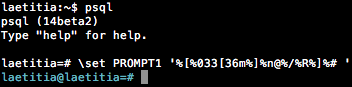
This feature is available since Postgres 8.0.
[ ... %] value can allow to customize the terminal exactly like your
terminal prompt.
laetitia:~$ psql
psql (14devel)
Type "help" for help.

laetitia=# \set PROMPT1 '%[%033[36m%]%n@%/%R%]%# '
# laetitia@laetitia=
This feature is available since Postgres 8.0.
Psql Tip #058
When already connected to
psql you can re-connect using the
\c or \connect meta-command.
laetitia:~$ psql
psql (14devel)
Type "help" for help.

laetitia=# \conninfo
You are connected to database "laetitia" as user "laetitia" via socket in "/tmp" at port "5432".
laetitia=# \c
You are now connected to database "laetitia" as user "laetitia".
laetitia=# \conninfo
You are connected to database "laetitia" as user "laetitia" via socket in "/tmp" at port "5432".Psql Tip #059
Anything you enter in psql that begins with an unquoted backslash is
a psql meta-command that is processed by psql itself. Meta-commands are
often called slash or backslash commands.
The format of a psql command is the backslash, followed immediately by a command verb, then any arguments. The arguments are separated from the command verb and each other by any number of whitespace characters.
The format of a psql command is the backslash, followed immediately by a command verb, then any arguments. The arguments are separated from the command verb and each other by any number of whitespace characters.
laetitia:~$ psql
psql (14devel)
Type "help" for help.

laetitia=# \test
invalid command \test
Try \? for help.Psql Tip #060
in interactive mode, you can connect to a different database with the
metacommand
\c dbname or \connect dbname
laetitia=# \conninfo
You are connected to database "laetitia" as user "laetitia" via socket in "/tmp" at port "5432".
laetitia=# \c postgres
You are now connected to database "postgres" as user "laetitia".
postgres=#Psql Tip #061
In interactive mode, you can connect to another database, host, port or
with another user by using the following metacommand
\c dbname username
	  host port
.
laetitia:~$ psql
psql (14devel)
Type "help" for help.

laetitia=# \conninfo
You are connected to database "laetitia" as user "laetitia" via socket in "/tmp" at port "5432".
laetitia=# \c laetitia laetitia localhost 5432
You are now connected to database "laetitia" as user "laetitia" on host "localhost" (address "::1") at port "5432".
laetitia=#\c dbname username and since Postgres 8.2 for \c dbname username host port.
Psql Tip #062
If a
\c or \connect metacommand fails (wrong user name, access denied,
etc.), the previous connection will be kept if psql is in interactive
mode. But when executing a non-interactive script, processing will
immediately stop with an error.
laetitia:~$ cat query.sql
\c latiatia
select * from test;
laetitia:~$ psql -f query.sql
psql:query.sql:1: error: \connect: connection to server on socket "/tmp/.s.PGSQL.5432" failed: FATAL:  database "latiatia" does not exist
laetitia:~$ psql
psql (14devel)
Type "help" for help.

laetitia=# \c latiatia
connection to server on socket "/tmp/.s.PGSQL.5432" failed: FATAL:  database "latiatia" does not exist
Previous connection kept
laetitia=#Psql Tip #063
You can use a
- to omit a positional parameter with the \c or
\connect meta-command.
laetitia=# \conninfo
You are connected to database "laetitia" as user "laetitia" via socket in "/tmp" at port "5432".
laetitia=# \c - - 127.0.0.1
You are now connected to database "laetitia" as user "laetitia" on host "127.0.0.1" at port "5432".Psql Tip #064
The
See Postgres documentation for connection URIs.
\c or
\connect metacommand can accept a connection URI
instead of a dbname.See Postgres documentation for connection URIs.
laetitia:~$ psql
psql (14devel)
Type "help" for help.

laetitia=# \conninfo
You are connected to database "laetitia" as user "laetitia" via socket in "/tmp" at port "5432".
laetitia=# \c postgresql://localhost
You are now connected to database "laetitia" as user "laetitia" on host "localhost" (address "::1") at port "5432".Psql Tip #065
The
See Postgres documentation for Keyword/Value connection strings.
\c or
\connect metacommand can accept a Keyword/Value
connection string instead of a dbname.See Postgres documentation for Keyword/Value connection strings.
laetitia=# \conninfo
You are connected to database "laetitia" as user "laetitia" via socket in "/tmp" at port "5432".
laetitia=# \c "host=localhost port=5432"
You are now connected to database "laetitia" as user "laetitia" on host "localhost" (address "::1") at port "5432".Psql Tip #066
The
\C title will allow you to set a title for your query. To unset
a title, just use \C.
laetitia=# \C 'test values'
Title is "test values".
laetitia=# select * from test;
test values
 id | value
----+-------
  1 | test
(1 row)

laetitia=# \C
Title is unset.
laetitia=# select * from test;
 id | value
----+-------
  1 | test
(1 row)Psql Tip #067
Use the
\conninfo metacommand to display information about the current
database connection.
laetitia:~$ psql
psql (14devel)
Type "help" for help.

laetitia=# \conninfo
You are connected to database "laetitia" as user "laetitia" via socket in "/tmp" at port "5432".Psql Tip #068
You can display copyright information and distribution term of PostgreSQL
by using the
\copyright metacommand.
laetitia=# \copyright
PostgreSQL Database Management System
(formerly known as Postgres, then as Postgres95)

Portions Copyright (c) 1996-2021, PostgreSQL Global Development Group

Portions Copyright (c) 1994, The Regents of the University of California

Permission to use, copy, modify, and distribute this software and its
documentation for any purpose, without fee, and without a written agreement
is hereby granted, provided that the above copyright notice and this
paragraph and the following two paragraphs appear in all copies.

IN NO EVENT SHALL THE UNIVERSITY OF CALIFORNIA BE LIABLE TO ANY PARTY FOR
DIRECT, INDIRECT, SPECIAL, INCIDENTAL, OR CONSEQUENTIAL DAMAGES, INCLUDING
LOST PROFITS, ARISING OUT OF THE USE OF THIS SOFTWARE AND ITS
DOCUMENTATION, EVEN IF THE UNIVERSITY OF CALIFORNIA HAS BEEN ADVISED OF THE
POSSIBILITY OF SUCH DAMAGE.

THE UNIVERSITY OF CALIFORNIA SPECIFICALLY DISCLAIMS ANY WARRANTIES,
INCLUDING, BUT NOT LIMITED TO, THE IMPLIED WARRANTIES OF MERCHANTABILITY
AND FITNESS FOR A PARTICULAR PURPOSE.  THE SOFTWARE PROVIDED HEREUNDER IS
ON AN "AS IS" BASIS, AND THE UNIVERSITY OF CALIFORNIA HAS NO OBLIGATIONS TO
PROVIDE MAINTENANCE, SUPPORT, UPDATES, ENHANCEMENTS, OR MODIFICATIONS.Psql Tip #069
\d pattern will display for each relation (table, view, materialized
view, index, sequence, or foreign table) or composite type matching the
pattern, all columns, their types, the tablespace (if not the
default) and any special attributes such as NOT NULL or defaults.
Associated indexes, constraints, rules, and triggers are also shown.
For foreign tables, the associated foreign server is shown as
well.For some types of relation,
\d shows additional information for each
column: column values for sequences, indexed expressions for indexes,
and foreign data wrapper options for foreign tables.
laetitia=# \d test
                          Table "public.test"
 Column |  Type   | Collation | Nullable |           Default
--------+---------+-----------+----------+------------------------------
 id     | integer |           | not null | generated always as identity
 value  | text    |           | not null |
Indexes:
"test_value_key" UNIQUE CONSTRAINT, btree (value)Psql Tip #070
The
\cd metacommand will change the current working directory.
laetitia=# \cd /tmp
laetitia=# \! pwd
/private/tmp Psql Tip #071
Using the
\d metacommand without a pattern will show a list of all
visible tables, views, materialized views, sequences and foreign tables.
laetitia=# \d
             List of relations
 Schema |    Name     |   Type   |  Owner
--------+-------------+----------+----------
 public | animal      | table    | laetitia
 public | test        | table    | laetitia
 public | test_id_seq | sequence | laetitia
(3 rows) Psql Tip #072
By default, the
\d won't show system object. You can either use
the \dS or supply pattern to include system objects.
laetitia=# \d
             List of relations
 Schema |    Name     |   Type   |  Owner
--------+-------------+----------+----------
 public | animal      | table    | laetitia
 public | test        | table    | laetitia
 public | test_id_seq | sequence | laetitia
(3 rows)

laetitia=# \dS
                         List of relations
   Schema   |              Name               |   Type   |  Owner
------------+---------------------------------+----------+----------
 pg_catalog | pg_aggregate                    | table    | postgres
 pg_catalog | pg_am                           | table    | postgres
 pg_catalog | pg_amop                         | table    | postgres
 pg_catalog | pg_amproc                       | table    | postgres
[...]
 pg_catalog | pg_views                        | view     | postgres
 public     | animal                          | table    | laetitia
 public     | test                            | table    | laetitia
 public     | test_id_seq                     | sequence | laetitia
(136 rows)

laetitia=# \d pg_aggregate
               Table "pg_catalog.pg_aggregate"
      Column      |   Type   | Collation | Nullable | Default
------------------+----------+-----------+----------+---------
 aggfnoid         | regproc  |           | not null |
 aggkind          | "char"   |           | not null |
 aggnumdirectargs | smallint |           | not null |
 aggtransfn       | regproc  |           | not null |
 aggfinalfn       | regproc  |           | not null |
 aggcombinefn     | regproc  |           | not null |
 aggserialfn      | regproc  |           | not null |
 aggdeserialfn    | regproc  |           | not null |
 aggmtransfn      | regproc  |           | not null |
 aggminvtransfn   | regproc  |           | not null |
 aggmfinalfn      | regproc  |           | not null |
 aggfinalextra    | boolean  |           | not null |
 aggmfinalextra   | boolean  |           | not null |
 aggfinalmodify   | "char"   |           | not null |
 aggmfinalmodify  | "char"   |           | not null |
 aggsortop        | oid      |           | not null |
 aggtranstype     | oid      |           | not null |
 aggtransspace    | integer  |           | not null |
 aggmtranstype    | oid      |           | not null |
 aggmtransspace   | integer  |           | not null |
 agginitval       | text     | C         |          |
 aggminitval      | text     | C         |          |
Indexes:
"pg_aggregate_fnoid_index" PRIMARY KEY, btree (aggfnoid) Psql Tip #073
The
+ modifier to the \d pattern metacommand will, on top of displaying
information about table, view, materialized view, index, sequence,
foreign table, or composite type matching the pattern, display any comments
associated with the columns of the table are shown, as is the presence of
OIDs in the table, the view definition if the relation is a view,
a non-default replica identity setting.
laetitia=# \d+ test
                                                       Table "public.test"
 Column |  Type   | Collation | Nullable |           Default            | Storage  | Compression | Stats target |  Description
--------+---------+-----------+----------+------------------------------+----------+-------------+--------------+----------------
 id     | integer |           | not null | generated always as identity | plain    |             |              |
 value  | text    |           | not null |                              | extended | pglz        |              | column comment
Indexes:
    "test_value_key" UNIQUE CONSTRAINT, btree (value)
Access method: heapPsql Tip #074
\dn will display a list of schemas. The S modifier will allow to list
system schemas too. \dn pattern will list schemas matching the pattern.
The + modifier will display access privileges and description.
laetitia=# \dn
  List of schemas
  Name  |  Owner
--------+----------
 public | postgres
(1 row)

laetitia=# \dnS
        List of schemas
        Name        |  Owner
--------------------+----------
 information_schema | postgres
 pg_catalog         | postgres
 pg_toast           | postgres
 public             | postgres
(4 rows)

laetitia=# \dn pub*
  List of schemas
  Name  |  Owner
--------+----------
 public | postgres
(1 row)i

laetitia=# \dn+ pub*
                          List of schemas
  Name  |  Owner   |  Access privileges   |      Description
--------+----------+----------------------+------------------------
 public | postgres | postgres=UC/postgres+| standard public schema
        |          | =UC/postgres         |
(1 row)+ modifier and
in Postgres 9.0 to add the S modifier.
Psql Tip #075
\db will display a list of tablespaces. \db pattern will list
tablespaces matching the pattern.
The + modifier will display access privileges, options, size and description.
laetitia=# \db
       List of tablespaces
    Name    |  Owner   | Location
------------+----------+----------
 pg_default | postgres |
 pg_global  | postgres |
(2 rows)

laetitia=# \db+
                                  List of tablespaces
    Name    |  Owner   | Location | Access privileges | Options |  Size  | Description
------------+----------+----------+-------------------+---------+--------+-------------
 pg_default | postgres |          |                   |         | 39 MB  |
 pg_global  | postgres |          |                   |         | 559 kB |
(2 rows)Psql Tip #076
\dD will display a list of domains. \dD pattern will list
domain matching the pattern.
The + modifier will also display access privileges and description.
The S modifier will also display the system domains. There is
currently no system domains provided with Postgres.
laetitia=# \dD
                                           List of domains
 Schema |     Name      | Type | Collation | Nullable | Default |                Check
--------+---------------+------+-----------+----------+---------+-------------------------------------
 public | one_word_only | text |           |          |         | CHECK (VALUE ~ '^[a-zA-Z]+$'::text)
(1 row)

laetitia=# \dD+
                                                            List of domains
 Schema |     Name      | Type | Collation | Nullable | Default |                Check                | Access privileges | Description
--------+---------------+------+-----------+----------+---------+-------------------------------------+-------------------+-------------
 public | one_word_only | text |           |          |         | CHECK (VALUE ~ '^[a-zA-Z]+$'::text) |                   |
(1 row)

laetitia=# \dDS
                                           List of domains
 Schema |     Name      | Type | Collation | Nullable | Default |                Check
--------+---------------+------+-----------+----------+---------+-------------------------------------
 public | one_word_only | text |           |          |         | CHECK (VALUE ~ '^[a-zA-Z]+$'::text)
(1 row)S
modifier and in Postgres 9.2 to add the + modifier.
Psql Tip #077
\ddp will display a list of default access privilege
settings. An entry is shown for each role (and schema, if applicable) for
which the default privilege settings have been changed from the built-in
defaults. If pattern is specified, only entries whose role name or schema
name matches the pattern are listed.
laetitia=# alter default privileges for role test revoke all on tables from test;
ALTER DEFAULT PRIVILEGES
laetitia=# \ddp
         Default access privileges
 Owner | Schema | Type  | Access privileges
-------+--------+-------+-------------------
 test  |        | table |
(1 row) S
modifier and inPostgres 9.2 to add the + modifier.
Psql Tip #078
\dE will display a list of foreign table. \dE pattern will list
foreign tables matching the pattern.
The + modifier will also display persistence, size and description.
The S modifier will also display the system foreign tables. There is
currently no system foreign table provided with Postgres.
laetitia=# \dE
            List of relations
 Schema | Name |     Type      |  Owner
--------+------+---------------+----------
 public | logs | foreign table | laetitia
(1 row)

laetitia=# \dE+
                               List of relations
 Schema | Name |     Type      |  Owner   | Persistence |  Size   | Description
--------+------+---------------+----------+-------------+---------+-------------
 public | logs | foreign table | laetitia | permanent   | 0 bytes |
(1 row)

laetitia=# \dES
            List of relations
 Schema | Name |     Type      |  Owner
--------+------+---------------+----------
 public | logs | foreign table | laetitia
(1 row)Psql Tip #079
\di will display the list of user created visible indexes. \di pattern will list
indexes matching the pattern.
The + modifier will also display persistence, access methode,
size and description.
The S modifier will also display the system indexes.
laetitia=# \di
                 List of relations
 Schema |      Name      | Type  |  Owner   | Table
--------+----------------+-------+----------+-------
 public | test_value_key | index | laetitia | test
(1 row)

laetitia=# \di+
                                           List of relations
 Schema |      Name      | Type  |  Owner   | Table | Persistence | Access Method | Size  | Description
--------+----------------+-------+----------+-------+-------------+---------------+-------+-------------
 public | test_value_key | index | laetitia | test  | permanent   | btree         | 16 kB |
(1 row)

laetitia=# \diS
List of relations
   Schema   |                     Name                      | Type  |  Owner   |          Table
------------+-----------------------------------------------+-------+----------+-------------------------
 pg_catalog | pg_aggregate_fnoid_index                      | index | postgres | pg_aggregate
 pg_catalog | pg_am_name_index                              | index | postgres | pg_am
 pg_catalog | pg_am_oid_index                               | index | postgres | pg_ami
[...]
 pg_catalog | pg_user_mapping_user_server_index             | index | postgres | pg_user_mapping
 public     | test_value_key                                | index | laetitia | test
(118 rows) S
modifier and inPostgres 8.4 to add the + modifier.
Psql Tip #080
\dm will display the list of user created and visible
materialized views. \dm pattern will list
materialized views matching the pattern.
The + modifier will also display persistence, access methode,
size and description.
The S modifier will also display the system materialized
views. There is currently no materialized views provided by Postgres.
laetitia=# \dm
              List of relations
 Schema | Name |       Type        |  Owner
--------+------+-------------------+----------
 public | mymv | materialized view | laetitia
(1 row)

laetitia=# \dm+
                                        List of relations
 Schema | Name |       Type        |  Owner   | Persistence | Access Method | Size  | Description
--------+------+-------------------+----------+-------------+---------------+-------+-------------
 public | mymv | materialized view | laetitia | permanent   | heap          | 16 kB |
(1 row)

laetitia=# \dmS
              List of relations
 Schema | Name |       Type        |  Owner
--------+------+-------------------+----------
 public | mymv | materialized view | laetitia
(1 row) Psql Tip #081
\ds will display the list of user created and visible
sequences. \ds pattern will list
sequences matching the pattern.
The + modifier will also display persistence,
size and description.
The S modifier will also display the system sequences.
laetitia=# \ds
                  List of relations
 Schema |         Name          |   Type   |  Owner
--------+-----------------------+----------+----------
 public | mytest_id_seq         | sequence | test
 public | partition_test_id_seq | sequence | laetitia
 public | test_id_seq           | sequence | laetitia
(3 rows)

(3 rows)

laetitia=# \ds+
 Schema |         Name          |   Type   |  Owner   | Persistence |    Size    | Description
--------+-----------------------+----------+----------+-------------+------------+-------------
 public | mytest_id_seq         | sequence | test     | permanent   | 8192 bytes |
 public | partition_test_id_seq | sequence | laetitia | permanent   | 8192 bytes |
 public | test_id_seq           | sequence | laetitia | permanent   | 8192 bytes |
                                       List of relations
laetitia=# \dsS
                  List of relations
 Schema |         Name          |   Type   |  Owner
--------+-----------------------+----------+----------
 public | mytest_id_seq         | sequence | test
 public | partition_test_id_seq | sequence | laetitia
 public | test_id_seq           | sequence | laetitia
(3 rows)S
modifier and in Postgres 8.4 to add the + modifier.
Psql Tip #082
\dt will display the list of user created and visible
tables. \dt pattern will list
tables matching the pattern.
The + modifier will also display persistence,
size and description.
The S modifier will also display the system tables.
laetitia=# \dt
                    List of relations
 Schema |      Name       |       Type        |  Owner
--------+-----------------+-------------------+----------
 public | animal          | table             | laetitia
 public | first_partition | table             | laetitia
 public | mytest          | table             | test
 public | partition_test  | partitioned table | laetitia
 public | test            | table             | laetitia
(5 rows)

laetitia=# \dt+
                                                 List of relations
 Schema |      Name       |       Type        |  Owner   | Persistence | Access Method |    Size    |  Description
--------+-----------------+-------------------+----------+-------------+---------------+------------+---------------
 public | animal          | table             | laetitia | permanent   | heap          | 16 kB      |
 public | first_partition | table             | laetitia | permanent   | heap          | 8192 bytes |
 public | mytest          | table             | test     | permanent   | heap          | 0 bytes    |
 public | partition_test  | partitioned table | laetitia | permanent   |               | 0 bytes    |
 public | test            | table             | laetitia | permanent   | heap          | 16 kB      | table comment
(5 rows)

laetitia=# \dtS
                          List of relations
   Schema   |          Name           |       Type        |  Owner
------------+-------------------------+-------------------+----------
 pg_catalog | pg_aggregate            | table             | postgres
 pg_catalog | pg_am                   | table             | postgres
[...]
 public     | partition_test          | partitioned table | laetitia
 public     | test                    | table             | laetitia
(67 rows)S
modifier and in Postgres 8.4 to add the + modifier.
Psql Tip #083
\dv will display the list of user created and visible
views. \dv pattern will list
views matching the pattern.
The + modifier will also display persistence,
size and description.
The S modifier will also display the system views.
laetitia=# \dv
         List of relations
 Schema |  Name  | Type |  Owner
--------+--------+------+----------
 public | myview | view | laetitia
(1 row)

laetitia=# \dv+
                            List of relations
 Schema |  Name  | Type |  Owner   | Persistence |  Size   | Description
--------+--------+------+----------+-------------+---------+-------------
 public | myview | view | laetitia | permanent   | 0 bytes |
(1 row)

laetitia=# \dvS
                       List of relations
   Schema   |              Name               | Type |  Owner
------------+---------------------------------+------+----------
 pg_catalog | pg_available_extension_versions | view | postgres
 pg_catalog | pg_available_extensions         | view | postgres
[...]
 pg_catalog | pg_views                        | view | postgres
 public     | myview                          | view | laetitia
(72 rows)S
modifier and in Postgres 8.4 to add the + modifier.
Psql Tip #084
\des will display a list of user create and visible foreign
servers. \des pattern will list
foreign servers matching the pattern.
The + modifier will also display access privileges, type, version, FDW option and description.
laetitia=# \des
         List of foreign servers
 Name  |  Owner   | Foreign-data wrapper
-------+----------+----------------------
 pglog | laetitia | file_fdw
(1 row)

laetitia=# \des+
                                         List of foreign servers
 Name  |  Owner   | Foreign-data wrapper | Access privileges | Type | Version | FDW options | Description
-------+----------+----------------------+-------------------+------+---------+-------------+-------------
 pglog | laetitia | file_fdw             |                   |      |         |             |
(1 row)Psql Tip #085
\det will display a list of user created and visible foreign
tables. \det pattern will list
foreign ables matching the pattern.
The + modifier will also display FDW option and description.
laetitia=# \det
 List of foreign tables
 Schema | Table | Server
--------+-------+--------
 public | logs  | pglog
(1 row)

laetitia=# \det+
                                List of foreign tables
 Schema | Table | Server |                  FDW options                  | Description
--------+-------+--------+-----------------------------------------------+-------------
 public | logs  | pglog  | (filename 'postgresql-Sun.csv', format 'csv') |
(1 row)Psql Tip #086
\df will display a list of user created and visible
functions. \df pattern will list
functions matching the pattern.
The + modifier will also display volatility, parallel safety,
owner, security, access privileges, language, source code and description.
The S modifier will also display the system functions.
laetitia=# \df
                              List of functions
 Schema |        Name        | Result data type | Argument data types | Type
--------+--------------------+------------------+---------------------+------
 public | file_fdw_handler   | fdw_handler      |                     | func
 public | file_fdw_validator | void             | text[], oid         | func
(2 rows)

laetitia=# \df+
                                                                                      List of functions
 Schema |        Name        | Result data type | Argument data types | Type | Volatility | Parallel |  Owner   | Security | Access privileges | Language |    Source code     | Description
--------+--------------------+------------------+---------------------+------+------------+----------+----------+----------+-------------------+----------+--------------------+-------------
 public | file_fdw_handler   | fdw_handler      |                     | func | volatile   | unsafe   | laetitia | invoker  |                   | c        | file_fdw_handler   |
 public | file_fdw_validator | void             | text[], oid         | func | volatile   | unsafe   | laetitia | invoker  |                   | c        | file_fdw_validator |
(2 rows)

laetitia=# \dfS xpath*
                             List of functions
   Schema   |     Name     | Result data type | Argument data types | Type
------------+--------------+------------------+---------------------+------
 pg_catalog | xpath        | xml[]            | text, xml           | func
 pg_catalog | xpath        | xml[]            | text, xml, text[]   | func
 pg_catalog | xpath_exists | boolean          | text, xml           | func
 pg_catalog | xpath_exists | boolean          | text, xml, text[]   | func
(4 rows)+ modifier and in Postgres 8.4 to add the S modifier.
Psql Tip #087
You can use the
a modifier to list only aggregate functions with the
\df meta command.
laetitia=# \dfa variance
                           List of functions
   Schema   |   Name   | Result data type | Argument data types | Type
------------+----------+------------------+---------------------+------
 pg_catalog | variance | numeric          | bigint              | agg
 pg_catalog | variance | double precision | double precision    | agg
 pg_catalog | variance | numeric          | integer             | agg
 pg_catalog | variance | numeric          | numeric             | agg
 pg_catalog | variance | double precision | real                | agg
 pg_catalog | variance | numeric          | smallint            | agg
(6 rows)Psql Tip #088
You can use the
n modifier to list only "normal" functions with the
\df meta command.
laetitia=# \dfn
                              List of functions
 Schema |        Name        | Result data type | Argument data types | Type
--------+--------------------+------------------+---------------------+------
 public | file_fdw_handler   | fdw_handler      |                     | func
 public | file_fdw_validator | void             | text[], oid         | func
(2 rows)Psql Tip #089
You can use the
p modifier to list only procedures with the
\df meta command.
laetitia=# \dfp
                          List of functions
 Schema |    Name    | Result data type | Argument data types | Type
--------+------------+------------------+---------------------+------
 public | inset_data |                  | a text              | proc
(1 row)Psql Tip #090
You can use the
t modifier to list only "trigger" functions with the
\df meta command.
laetitia=# \dftS
                                        List of functions
   Schema   |                Name                | Result data type | Argument data types | Type
------------+------------------------------------+------------------+---------------------+------
 pg_catalog | RI_FKey_cascade_del                | trigger          |                     | func
 pg_catalog | RI_FKey_cascade_upd                | trigger          |                     | func
 pg_catalog | RI_FKey_check_ins                  | trigger          |                     | func
 pg_catalog | RI_FKey_check_upd                  | trigger          |                     | func
 pg_catalog | RI_FKey_noaction_del               | trigger          |                     | func
 pg_catalog | RI_FKey_noaction_upd               | trigger          |                     | func
 pg_catalog | RI_FKey_restrict_del               | trigger          |                     | func
 pg_catalog | RI_FKey_restrict_upd               | trigger          |                     | func
 pg_catalog | RI_FKey_setdefault_del             | trigger          |                     | func
 pg_catalog | RI_FKey_setdefault_upd             | trigger          |                     | func
 pg_catalog | RI_FKey_setnull_del                | trigger          |                     | func
 pg_catalog | RI_FKey_setnull_upd                | trigger          |                     | func
 pg_catalog | suppress_redundant_updates_trigger | trigger          |                     | func
 pg_catalog | trigger_in                         | trigger          | cstring             | func
 pg_catalog | tsvector_update_trigger            | trigger          |                     | func
 pg_catalog | tsvector_update_trigger_column     | trigger          |                     | func
 pg_catalog | unique_key_recheck                 | trigger          |                     | func
(17 rows)Psql Tip #091
You can use the
w modifier to list only "window" functions with the
\df meta command.
laetitia=# \dfwS
                                       List of functions
   Schema   |     Name     | Result data type |          Argument data types          |  Type
------------+--------------+------------------+---------------------------------------+--------
 pg_catalog | cume_dist    | double precision |                                       | window
 pg_catalog | dense_rank   | bigint           |                                       | window
 pg_catalog | first_value  | anyelement       | anyelement                            | window
 pg_catalog | lag          | anycompatible    | anycompatible, integer, anycompatible | window
 pg_catalog | lag          | anyelement       | anyelement                            | window
 pg_catalog | lag          | anyelement       | anyelement, integer                   | window
 pg_catalog | last_value   | anyelement       | anyelement                            | window
 pg_catalog | lead         | anycompatible    | anycompatible, integer, anycompatible | window
 pg_catalog | lead         | anyelement       | anyelement                            | window
 pg_catalog | lead         | anyelement       | anyelement, integer                   | window
 pg_catalog | nth_value    | anyelement       | anyelement, integer                   | window
 pg_catalog | ntile        | integer          | integer                               | window
 pg_catalog | percent_rank | double precision |                                       | window
 pg_catalog | rank         | bigint           |                                       | window
 pg_catalog | row_number   | bigint           |                                       | window
(15 rows)Psql Tip #092
The description column displayed when using the
+ modifier of a \d
metacommand can be filled using the comment SQL command.
laetitia=# \d+ test
                                                       Table "public.test"
 Column |  Type   | Collation | Nullable |           Default            | Storage  | Compression | Stats target |  Description
--------+---------+-----------+----------+------------------------------+----------+-------------+--------------+----------------
 id     | integer |           | not null | generated always as identity | plain    |             |              |
 value  | text    |           | not null |                              | extended | pglz        |              | column comment
Indexes:
    "test_value_key" UNIQUE CONSTRAINT, btree (value)
Access method: heap

laetitia=# comment on column test.id IS 'My awesome comment';
COMMENT
laetitia=# \d+ test
                                                         Table "public.test"
 Column |  Type   | Collation | Nullable |           Default            | Storage  | Compression | Stats target |    Description
--------+---------+-----------+----------+------------------------------+----------+-------------+--------------+--------------------
 id     | integer |           | not null | generated always as identity | plain    |             |              | My awesome comment
 value  | text    |           | not null |                              | extended | pglz        |              | column comment
Indexes:
    "test_value_key" UNIQUE CONSTRAINT, btree (value)
Access method: heapcomment SQL command. the + modifier
appeared in different version, depending on the metacommand.
Psql Tip #093
\dg will display a list of user created and visible
roles. \dg pattern will list
roles matching the pattern.
The + modifier will also display description.
The S modifier will also display the system roles.
laetitia=# \dg
                                   List of roles
 Role name |                         Attributes                         | Member of
-----------+------------------------------------------------------------+-----------
 laetitia  | Superuser                                                  | {}
 postgres  | Superuser, Create role, Create DB, Replication, Bypass RLS | {}
 test      |                                                            | {}

laetitia=# \dg+
                                          List of roles
 Role name |                         Attributes                         | Member of | Description
-----------+------------------------------------------------------------+-----------+-------------
 laetitia  | Superuser                                                  | {}        |
 postgres  | Superuser, Create role, Create DB, Replication, Bypass RLS | {}        |
 test      |                                                            | {}        |

laetitia=# \dgS
                                                                     List of roles
         Role name         |                         Attributes                         |                          Member of
---------------------------+------------------------------------------------------------+--------------------------------------------------------------
 laetitia                  | Superuser                                                  | {}
 pg_execute_server_program | Cannot login                                               | {}
 pg_monitor                | Cannot login                                               | {pg_read_all_settings,pg_read_all_stats,pg_stat_scan_tables}
 pg_read_all_settings      | Cannot login                                               | {}
 pg_read_all_stats         | Cannot login                                               | {}
 pg_read_server_files      | Cannot login                                               | {}
 pg_signal_backend         | Cannot login                                               | {}
 pg_stat_scan_tables       | Cannot login                                               | {}
 pg_write_server_files     | Cannot login                                               | {}
 postgres                  | Superuser, Create role, Create DB, Replication, Bypass RLS | {}
test | | {} + modifier and in Postgres 9.6 to add the S modifier.
Psql Tip #094
\dl will list the large objects in this database.
laetitia=# \dl
      Large objects
 ID | Owner | Description
----+-------+-------------
(0 rows)Psql Tip #095
\dL will display a list of user created and visible
procedural languages. \df pattern will list
functions matching the pattern.
The + modifier will also display if it's an internal language,
the call handler, the validator, the inline handler,
access privileges and description.
The S modifier will also display the system procedural languages.
laetitia=# \dl
      Large objects
 ID | Owner | Description
----+-------+-------------
(0 rows)

laetitia=# \dL
                      List of languages
  Name   |  Owner   | Trusted |         Description
---------+----------+---------+------------------------------
 plpgsql | postgres | t       | PL/pgSQL procedural language
(1 row)

laetitia=# \dL+
                                                                                    List of languages
  Name   |  Owner   | Trusted | Internal language |      Call handler      |       Validator        |          Inline handler          | Access privileges |         Description
---------+----------+---------+-------------------+------------------------+------------------------+----------------------------------+-------------------+------------------------------
 plpgsql | postgres | t       | f                 | plpgsql_call_handler() | plpgsql_validator(oid) | plpgsql_inline_handler(internal) |                   | PL/pgSQL procedural language
(1 row)

laetitia=# \dLS
                       List of languages
   Name   |  Owner   | Trusted |          Description
----------+----------+---------+--------------------------------
 c        | postgres | f       | dynamically-loaded C functions
 internal | postgres | f       | built-in functions
 plpgsql  | postgres | t       | PL/pgSQL procedural language
 sql      | postgres | t       | SQL-language functions
(4 rows)+ modifier and in Postgres 8.4 to add the S modifier.
Psql Tip #096
\dp will display a list of tables, views and sequences
with their associated access privileges.
\dp pattern will list
only tables, views and sequences whose names match the pattern are listed.
The access privileges column signification is explained in table 5.2.
ilaetitia=# \dp
                                               Access privileges
 Schema |         Name          |       Type        |     Access privileges     | Column privileges | Policies
--------+-----------------------+-------------------+---------------------------+-------------------+----------
 public | animal                | table             |                           |                   |
 public | first_partition       | table             |                           |                   |
 public | logs                  | foreign table     |                           |                   |
 public | mymv                  | materialized view |                           |                   |
 public | mytest                | table             |                           |                   |
 public | mytest_id_seq         | sequence          |                           |                   |
 public | myview                | view              |                           |                   |
 public | partition_test        | partitioned table |                           |                   |
 public | partition_test_id_seq | sequence          |                           |                   |
 public | test                  | table             | laetitia=arwdDxt/laetitia |                   |
 public | test_id_seq           | sequence          |                           |                   |
(11 rows)Psql Tip #097
\dP will display a list of partitioned tables and indexes.
\dP pattern will list partitioned tables and indexes
matching the pattern.
The + modifier will also display the size and the
description.
laetitia=# \dP
                         List of partitioned relations
 Schema |         Name          |  Owner   |       Type        |     Table
--------+-----------------------+----------+-------------------+----------------
 public | partition_test        | laetitia | partitioned table |
 public | partition_test_id_idx | laetitia | partitioned index | partition_test
(2 rows)

laetitia=# \dP+
                                       List of partitioned relations
 Schema |         Name          |  Owner   |       Type        |     Table      | Total size | Description
--------+-----------------------+----------+-------------------+----------------+------------+-------------
 public | partition_test        | laetitia | partitioned table |                | 8192 bytes |
 public | partition_test_id_idx | laetitia | partitioned index | partition_test | 8192 bytes |
(2 rows)Psql Tip #098
the
i modifier appended to the dP metacommand will list only
partitioned indexes.
ilaetitia=# \dPi
                List of partitioned indexes
 Schema |         Name          |  Owner   |     Table
--------+-----------------------+----------+----------------
 public | partition_test_id_idx | laetitia | partition_test
(1 row)Psql Tip #099
the
t modifier appended to the dP metacommand will list only
partitioned tables.
laetitia=# \dPt
     List of partitioned tables
 Schema |      Name      |  Owner
--------+----------------+----------
 public | partition_test | laetitia
(1 row)

laetitia=# \dPt+
                  List of partitioned tables
 Schema |      Name      |  Owner   | Total size | Description
--------+----------------+----------+------------+-------------
 public | partition_test | laetitia | 8192 bytes |
(1 row)Psql Tip #100
the
n modifier appended to the dP metacommand will list also
non-root partitioned tables and ndexes. A column displaying also the
parent name is added to the result.
laetitia=# \dPn
                                List of partitioned relations
 Schema |         Name          |  Owner   |       Type        | Parent name |     Table
--------+-----------------------+----------+-------------------+-------------+----------------
 public | partition_test        | laetitia | partitioned table |             |
 public | partition_test_id_idx | laetitia | partitioned index |             | partition_test
(2 rows)

laetitia=# \dPn+
                                                         List of partitioned relations
 Schema |         Name          |  Owner   |       Type        | Parent name |     Table      | Leaf partition size | Total size | Description
--------+-----------------------+----------+-------------------+-------------+----------------+---------------------+------------+-------------
 public | partition_test        | laetitia | partitioned table |             |                | 8192 bytes          | 8192 bytes |
 public | partition_test_id_idx | laetitia | partitioned index |             | partition_test | 8192 bytes          | 8192 bytes |
(2 rows)Psql Tip #101
\copy ... to ... will allow you to copy data to a file on the client
host.
laetitia=# \copy (select * from test) to mydata.dmp
COPY 2
laetitia=# \! cat mydata.dmp
1       test
5 blablaPsql Tip #102
\copy will allow you to copy data from something into a table (something
might be the result of a command, a program, stdin...)
laetitia=# \copy test(value) from stdin
Enter data to be copied followed by a newline.
End with a backslash and a period on a line by itself, or an EOF signal.
>> value1
>> value2
>> \.
COPY 2
laetitia=# select * from test;
 id | value
----+--------
  1 | test
  5 | blabla
  6 | value1
  7 | value2
(4 rows)Psql Tip #103
\copy is different than the SQL command copy in that the \copy
meta-command will be played from the client side without superuser
permissions while the copy SQL command needs database superuser or users
users who are granted one of the default roles pg_read_server_files,
pg_write_server_files, or pg_execute_server_program.
laetitia=# \c laetitia test
You are now connected to database "laetitia" as user "test".
laetitia=> \du
                                   List of roles
 Role name |                         Attributes                         | Member of
-----------+------------------------------------------------------------+-----------
 laetitia  | Superuser                                                  | {}
 postgres  | Superuser, Create role, Create DB, Replication, Bypass RLS | {}
 test      |                                                            | {}

laetitia=> \copy (select * from test) to mydata.dmp
COPY 4
laetitia=> \! cat mydata.dmp
1       test
5       blabla
6       value1
7 value2Psql Tip #104
\copy is less efficient than the SQL command copy because all data
must pass through the client/server connection. For large amount of data,
the SQL command is better.
This feature is available since at least Postgres 7.1.
Psql Tip #105
The default delimiter for text entry in stdin (either using the
\copy
meta-command or the copy SQL command) is a tab character.
laetitia=> create table data(d1 integer, d2 date);
CREATE TABLE
laetitia=> \copy data from stdin
Enter data to be copied followed by a newline.
End with a backslash and a period on a line by itself, or an EOF signal.
>> 1    '2021-04-12'
>> 2 '2021-04-13'
>> \.
ERROR:  invalid input syntax for type integer: "2 '2021-04-13'"
CONTEXT: COPY data, line 2, column d1: "2 '2021-04-13'"Psql Tip #106
\crosstabview is a meta-command that will create a crosstabview from the
query in the current query buffer.
By default the first column will become the column header while the second
column will become the horizontal header.
The data from the third column will fill the table.
laetitia=> select * from music ;
        artist         |       album       | year
-----------------------+-------------------+------
 Foo Fighters          | Concrete and Gold | 2017
 Red Hot Chili Peppers | The Getaway       | 2016
 Green Day             | ¡Uno!             | 2012
(3 rows)

laetitia=> \crosstabview
        artist         | Concrete and Gold | The Getaway | ¡Uno!
-----------------------+-------------------+-------------+-------
 Foo Fighters          |              2017 |             |
 Red Hot Chili Peppers |                   |        2016 |
 Green Day             |                   |             |  2012
(3 rows)Psql Tip #107
You can pass the name of the columns to use as Vertical and Horizontal
headers to the
\crosstabview meta-command.
laetitia=> select * from music ;
        artist         |       album       | year
-----------------------+-------------------+------
 Foo Fighters          | Concrete and Gold | 2017
 Red Hot Chili Peppers | The Getaway       | 2016
 Green Day             | ¡Uno!             | 2012
(3 rows)

laetitia=> laetitia=> \crosstabview artist year
        artist         |       2017        |    2016     | 2012
-----------------------+-------------------+-------------+-------
 Foo Fighters          | Concrete and Gold |             |
 Red Hot Chili Peppers |                   | The Getaway |
 Green Day             |                   |             | ¡Uno!
(3 rows)Psql Tip #108
You can pass the number of the columns to use as Vertical and Horizontal
headers to the
\crosstabview meta-command as you would use number of
columns in an order by SQL clause.
laetitia=> select * from music ;
        artist         |       album       | year
-----------------------+-------------------+------
 Foo Fighters          | Concrete and Gold | 2017
 Red Hot Chili Peppers | The Getaway       | 2016
 Green Day             | ¡Uno!             | 2012
(3 rows)

laetitia=> laetitia=> \crosstabview 1 3
        artist         |       2017        |    2016     | 2012
-----------------------+-------------------+-------------+-------
 Foo Fighters          | Concrete and Gold |             |
 Red Hot Chili Peppers |                   | The Getaway |
 Green Day             |                   |             | ¡Uno!
(3 rows)Psql Tip #109
The
\drds meta-command will display the specific role based or database
based settings.
laetitia=# \drds
             List of settings
   Role   | Database |      Settings
----------+----------+--------------------
 laetitia |          | work_mem=250MB
          | laetitia | search_path=public+
          |          | work_mem=500MB
(2 rows)

laetitia=# \drds * laetitia
           List of settings
 Role | Database |      Settings
------+----------+--------------------
      | laetitia | search_path=public+
      |          | work_mem=500MB
(1 row)

laetitia=# \drds laetitia
           List of settings
   Role   | Database |    Settings
----------+----------+----------------
 laetitia |          | work_mem=250MB
(1 row)Psql Tip #110
\dT will display a list of data types. The S modifier will allow to
list system data types too. \dT pattern will list data types matching
the pattern. the + Internal name, size, Elements, Owner and Access
privileges.
laetitia=# \dT
          List of data types
 Schema |     Name      | Description
--------+---------------+-------------
 public | one_word_only |
(1 row)

laetitia=# \dTS line
         List of data types
   Schema   | Name |  Description
------------+------+----------------
 pg_catalog | line | geometric line
(1 row)

laetitia=# \dT+
                                          List of data types
 Schema |     Name      | Internal name | Size | Elements |  Owner   | Access privileges | Description
--------+---------------+---------------+------+----------+----------+-------------------+-------------
 public | one_word_only | one_word_only | var  |          | laetitia |                   |
(1 row)Psql Tip #111
\dT will display a list of data types. The S modifier will allow to
list system data types too. \dT pattern will list data types matching
the pattern. the + modifier will also display Internal name, size, Elements, Owner and Access
privileges.
laetitia=# \dT
          List of data types
 Schema |     Name      | Description
--------+---------------+-------------
 public | one_word_only |
(1 row)

laetitia=# \dTS line
         List of data types
   Schema   | Name |  Description
------------+------+----------------
 pg_catalog | line | geometric line
(1 row)

laetitia=# \dT+
                                          List of data types
 Schema |     Name      | Internal name | Size | Elements |  Owner   | Access privileges | Description
--------+---------------+---------------+------+----------+----------+-------------------+-------------
 public | one_word_only | one_word_only | var  |          | laetitia |                   |
(1 row)Psql Tip #112
\du will display a list of users. Remember that since Postgres 8.1,
users and roles are the same thing (see Postgres
documentation).The
S modifier will allow to display system roles too.
du pattern will match only roles macthing the specified pattern. The
+ modifier will display the description for each role.
laetitia=# \du
                                   List of roles
 Role name |                         Attributes                         | Member of
-----------+------------------------------------------------------------+-----------
 laetitia  | Superuser                                                  | {}
 postgres  | Superuser, Create role, Create DB, Replication, Bypass RLS | {}
 test      |                                                            | {}

laetitia=# \duS
                                                                     List of roles
         Role name         |                         Attributes                         |                          Member of
---------------------------+------------------------------------------------------------+--------------------------------------------------------------
 laetitia                  | Superuser                                                  | {}
 pg_database_owner         | Cannot login                                               | {}
 pg_execute_server_program | Cannot login                                               | {}
 pg_monitor                | Cannot login                                               | {pg_read_all_settings,pg_read_all_stats,pg_stat_scan_tables}
 pg_read_all_data          | Cannot login                                               | {}
 pg_read_all_settings      | Cannot login                                               | {}
 pg_read_all_stats         | Cannot login                                               | {}
 pg_read_server_files      | Cannot login                                               | {}
 pg_signal_backend         | Cannot login                                               | {}
 pg_stat_scan_tables       | Cannot login                                               | {}
 pg_write_all_data         | Cannot login                                               | {}
 pg_write_server_files     | Cannot login                                               | {}
 postgres                  | Superuser, Create role, Create DB, Replication, Bypass RLS | {}
 test                      |                                                            | {}

laetitia=# \du+
                                          List of roles
 Role name |                         Attributes                         | Member of | Description
-----------+------------------------------------------------------------+-----------+-------------
 laetitia  | Superuser                                                  | {}        |
 postgres  | Superuser, Create role, Create DB, Replication, Bypass RLS | {}        |
test | | {} | + modifier and in Postgres 9.6 to add the S modifier.
Psql Tip #113
Since Postgres 8.1, groups and users are implemented as roles. It means there is not difference between\dg and \du.
laetitia=# \dg
                                    List of roles
 Role name |                         Attributes                         |  Member of
-----------+------------------------------------------------------------+-------------
 grouptest | Cannot login                                               | {}
 laetitia  | Superuser                                                  | {}
 postgres  | Superuser, Create role, Create DB, Replication, Bypass RLS | {}
 test      |                                                            | {grouptest}

laetitia=# \du
                                    List of roles
 Role name |                         Attributes                         |  Member of
-----------+------------------------------------------------------------+-------------
 grouptest | Cannot login                                               | {}
 laetitia  | Superuser                                                  | {}
 postgres  | Superuser, Create role, Create DB, Replication, Bypass RLS | {}
test | | {grouptest}Psql Tip #114
The
\dx metacommand will display a list of installed
extensions. \dx pattern will display only extensions matching the given
pattern. The + modifier will allow to display a list of all the objects
belonging to each extension.
laetitia=# \dx
                 List of installed extensions
  Name   | Version |   Schema   |         Description
---------+---------+------------+------------------------------
 plpgsql | 1.0     | pg_catalog | PL/pgSQL procedural language
(1 row)

laetitia=# \dx+
      Objects in extension "plpgsql"
            Object description
-------------------------------------------
 function plpgsql_call_handler()
 function plpgsql_inline_handler(internal)
 function plpgsql_validator(oid)
 language plpgsql
(4 rows)Psql Tip #115
The
If none of those variables are set, the default editor is
This feature is available since at least Postgres 7.1 for Unix system and since Postgres run under Windows for Windows version.
\e (or \edit) will open the current querry buffer
into the default editor (or the editor set by the PSQL_EDITOR, the
EDITOR or the VISUAL variables.If none of those variables are set, the default editor is
vi on Unix systems
and notepad.exe under Windows. This feature is available since at least Postgres 7.1 for Unix system and since Postgres run under Windows for Windows version.
Psql Tip #116
You can open a file under psql using the
If the modifications are not saved before the editor is quitted, the query buffer is cleared.
If a query ends by a semi-colon, it will be immediately executed. The file can contain several queries. psql will play the file as a single line command meaning that anything right after a psql's metacoomand will be considered as an argument to the metacommand even though there are some line breaks.
This feature is available since at least Postgres 7.1.
Before Postgres 14, even if you didn't save the modifications before exiting, they were sent to the query buffer (and immediately executed if ended by a semi-colon).
\e filename.
The file will open in the editor and after saving and exiting the editor, the content
of the file will be copied into the query buffer.If the modifications are not saved before the editor is quitted, the query buffer is cleared.
If a query ends by a semi-colon, it will be immediately executed. The file can contain several queries. psql will play the file as a single line command meaning that anything right after a psql's metacoomand will be considered as an argument to the metacommand even though there are some line breaks.
This feature is available since at least Postgres 7.1.
Before Postgres 14, even if you didn't save the modifications before exiting, they were sent to the query buffer (and immediately executed if ended by a semi-colon).
Psql Tip #117
You can use the metacommand
If the filename is omitted, psql will open the current querry buffer (if empty the last executed query will be copied into the current querry buffer) and position the cursor on the specified line number. It means that if a single all-digits argument is given, psql will assume it's a line number.
If the line number specified is higher than the number of lines in the querry buffer or in the file, the cursor will be positionned on the last line.
This feature is available since Postgres 9.1.
\e filename linenumber to
open a file and position the cursor directly on the specified
line.If the filename is omitted, psql will open the current querry buffer (if empty the last executed query will be copied into the current querry buffer) and position the cursor on the specified line number. It means that if a single all-digits argument is given, psql will assume it's a line number.
If the line number specified is higher than the number of lines in the querry buffer or in the file, the cursor will be positionned on the last line.
This feature is available since Postgres 9.1.
Psql Tip #118
Use
You can get rid of the trailing new line by using
\echo to display text or evaluated argument to the
standard output.You can get rid of the trailing new line by using
-n as a first argument.
laetitia=# \echo test
test
laetitia=# \echo `date`
Fri Jul 30 10:13:41 CEST 2021
laetitia=# \echo -n `date`
Fri Jul 30 10:13:47 CEST 2021laetitia=#Psql Tip #119
While
\echo will send the result in the standard output,
use \qecho if you'd like the result to be written inside a file you
specified using the \o metacommand.
laetitia=# \o /tmp/output.out
laetitia=# \echo `date`
Fri Jul 30 10:23:58 CEST 2021
laetitia=# \! cat /tmp/output.out
laetitia=# \qecho `date`
laetitia=# \! cat /tmp/output.out
Fri Jul 30 10:24:25 CEST 2021Psql Tip #120
The
If there are several functions with the same name, you will need to add the signature of the function so psql knows which one needs modification.
\ef function metacommand will open the create or
replace function (or create or replace procedure) containing the code of
the function (or procedure) you named.If there are several functions with the same name, you will need to add the signature of the function so psql knows which one needs modification.
laetitia=# \df add_em
                                 List of functions
 Schema |  Name  | Result data type |          Argument data types           | Type
--------+--------+------------------+----------------------------------------+------
 public | add_em | double precision | x double precision, y double precision | func
 public | add_em | integer          | x integer, y integer                   | func
(2 rows)

laetitia=# \ef add_em
ERROR:  more than one function named "add_em"
laetitia=# \ef add_em(integer, integer)
No changesPsql Tip #121
The
\ef function linenumber metacommand will open the create or
replace function (or create or replace procedure) containing the code of
the function (or procedure) you named and will position the cursor directly
to the line number specified.
This feature is available since Postgres 9.1. Procedures were added with Postgres 11.
Psql Tip #122
The
If no function name is specified, a
\ef function metacommand will open the create or
replace function (or create or replace procedure) containing the code of
the function (or procedure) you named.If no function name is specified, a
create function template is created.
This feature is available
since Postgres 9.1. Procedures were added with Postgres 11.
Psql Tip #123
The
\ev view metacommand will open the create or
replace view containing the SQL code of
the view you named.laetitia=# \dv connection_settings
List of relations
Schema | Name | Type | Owner
--------+---------------------+------+----------
public | connection_settings | view | laetitia
(1 row)
laetitia=# \ev connection_settings
laetitia=# CREATE OR REPLACE VIEW public.connection_settings AS
SELECT pg_settings.name,
pg_settings.setting,
pg_settings.unit
FROM pg_settings
WHERE pg_settings.name ~ 'connection'::textPsql Tip #124
The
If no view name is specified, a
\ev view metacommand will open the create or
replace view containing the SQL code of
the view you named.If no view name is specified, a
create view template is created.
This feature is available since Postgres 9.6.
Psql Tip #125
The
\ev view linenumber metacommand will open the create or
replace view containing the code of the view you named and will position the cursor directly
to the line number specified.
This feature is available since Postgres 9.6.
Psql Tip #126
The
\g metacommand will execute the last query in the
query buffer.
laetitia=# select * from test;
 id | value
----+-------
  1 | bla
  2 | bla
  3 | bla
  4 | bla
  5 | bla
  6 | bla
(6 rows)

laetitia=# \g
 id | value
----+-------
  1 | bla
  2 | bla
  3 | bla
  4 | bla
  5 | bla
  6 | bla
(6 rows)Psql Tip #127
You can use the
\g metacommand to execute a query as an
alternative to the semicolon character (;).
laetitia=# select * from test\g
 id | value
----+-------
  1 | bla
  2 | bla
  3 | bla
  4 | bla
  5 | bla
  6 | bla
(6 rows)Psql Tip #128
You can use the
\g filename metacommand to execute a query
and store the result in the file named filename. Unless the complete path
is given, the file will be stored in the current directory (that you can
display with \! pwd
laetitia=# select * from test;
 id | value
----+-------
  1 | bla
  2 | bla
  3 | bla
  4 | bla
  5 | bla
  6 | bla
(6 rows)

laetitia=# \g output.log
laetitia=# \! cat output.log
 id | value
----+-------
  1 | bla
  2 | bla
  3 | bla
  4 | bla
  5 | bla
  6 | bla
(6 rows)

laetitia=# \! pwd
/Users/laetitia/tech/laetitia/psql-tips/toolsPsql Tip #129
You can use the
\g | command metacommand to send the
query result to a shell command.
laetitia=# select setting
laetitia-# from pg_settings
laetitia-# where name= 'data_directory';
        setting
-----------------------
 /usr/local/pgsql/data
(1 row)

laetitia=# \g |grep 'data'
/usr/local/pgsql/dataPsql Tip #130
You can use format options combined with the
\g
metacommand to re-execute the previous query with formatting options.
laetitia=# select * from test;
 id | value
----+-------
  1 | bla
  2 | bla
  3 | bla
  4 | bla
  5 | bla
  6 | bla
(6 rows)

laetitia=# \g (footer=off format=csv)
id,value
1,bla
2,bla
3,bla
4,bla
5,bla
6,blaPsql Tip #131
The
\gdesc
metacommand will show the decsription (column names and datatypes) of the
current query buffer. The wuery is not actually executed.
laetitia=# select * from test;
 id | value
----+-------
  1 | bla
  2 | bla
  3 | bla
  4 | bla
  5 | bla
  6 | bla
(6 rows)

laetitia=# \gdesc
 Column |  Type
--------+---------
 id     | integer
 value  | text
(2 rows)
Psql Tip #132
The
\exec
metacommand will execute the result of the current query or the last query
if the current query buffer is empty. This is a very useful feature to
generate DDL and execute it in one go.
laetitia=*# select 'drop table ' || table_name
laetitia-*# from information_schema.tables
laetitia-*# where table_schema = 'public'
laetitia-*#   and table_name ~ 'test';
     ?column?
------------------
 drop table test
 drop table test2
 drop table test3
(3 rows)

laetitia=*# \gexec
DROP TABLE
DROP TABLE
DROP TABLEPsql Tip #133
The
\gset
metacommand will execute the result of the current query or the last query
if the current query buffer is empty and assign variables named as the
column names with the value. It only works if the query returns only one
row.
laetitia=# select *
laetitia-# from test
laetitia-# where id=5;
 id | value
----+-------
  5 | bla
(1 row)

laetitia=# \gset
laetitia=# \echo 'id: ' :id ', value: ' :value
id: 5 , value: blaPsql Tip #134
The
\gset prefix
metacommand will execute the result of the current query or the last query
if the current query buffer is empty and assign variables named as the
column names with the given prefix and the value. It only works if the query returns only one
row.
laetitia=# laetitia=# select *
from test
where id=5;
 id | value
----+-------
  5 | bla
(1 row)

laetitia=# \gset test_
laetitia=# \echo 'id: ' :test_id ', value: ' :test_value
id: 5 , value: blaPsql Tip #135
The
\gx
metacommand will execute the result of the current query or the last query
if the current query buffer but will force the expanded output mode.
laetitia=# select * from pg_settings where name = 'log_directory';
     name      | setting | unit |               category               |                  short_desc                   |                               extra_desc                                | context | vartype | source  | min_val | max_val | enumvals | boot_val | reset_val | sourcefile | sourceline | pending_restart
---------------+---------+------+--------------------------------------+-----------------------------------------------+-------------------------------------------------------------------------+---------+---------+---------+---------+---------+----------+----------+-----------+------------+------------+-----------------
 log_directory | log     |      | Reporting and Logging / Where to Log | Sets the destination directory for log files. | Can be specified as relative to the data directory or as absolute path. | sighup  | string  | default |         |         |          | log      | log       |            |            | f
(1 row)

laetitia=# \gx
-[ RECORD 1 ]---+------------------------------------------------------------------------
name            | log_directory
setting         | log
unit            |
category        | Reporting and Logging / Where to Log
short_desc      | Sets the destination directory for log files.
extra_desc      | Can be specified as relative to the data directory or as absolute path.
context         | sighup
vartype         | string
source          | default
min_val         |
max_val         |
enumvals        |
boot_val        | log
reset_val       | log
sourcefile      |
sourceline      |
pending_restart | fPsql Tip #136
As the
\g metacommand, the \gx
metacommand can send the result of a query in a file.
laetitia=# select * from pg_settings where name = 'log_directory';
     name      | setting | unit |               category               |                  short_desc                   |                               extra_desc                                | context | vartype | source  | min_val | max_val | enumvals | boot_val | reset_val | sourcefile | sourceline | pending_restart
---------------+---------+------+--------------------------------------+-----------------------------------------------+-------------------------------------------------------------------------+---------+---------+---------+---------+---------+----------+----------+-----------+------------+------------+-----------------
 log_directory | log     |      | Reporting and Logging / Where to Log | Sets the destination directory for log files. | Can be specified as relative to the data directory or as absolute path. | sighup  | string  | default |         |         |          | log      | log       |            |            | f
(1 row)

laetitia=# \gx log_directory.output
laetitia=# \! cat log_directory.output
-[ RECORD 1 ]---+------------------------------------------------------------------------
name            | log_directory
setting         | log
unit            |
category        | Reporting and Logging / Where to Log
short_desc      | Sets the destination directory for log files.
extra_desc      | Can be specified as relative to the data directory or as absolute path.
context         | sighup
vartype         | string
source          | default
min_val         |
max_val         |
enumvals        |
boot_val        | log
reset_val       | log
sourcefile      |
sourceline      |
pending_restart | fPsql Tip #137
As the
\g metacommand, the \gx
metacommand can send the result of a query to a command.
laetitia=# select * from pg_settings where name = 'log_directory';
     name      | setting | unit |               category               |                  short_desc                   |                               extra_desc                                | context | vartype | source  | min_val | max_val | enumvals | boot_val | reset_val | sourcefile | sourceline | pending_restart
---------------+---------+------+--------------------------------------+-----------------------------------------------+-------------------------------------------------------------------------+---------+---------+---------+---------+---------+----------+----------+-----------+------------+------------+-----------------
 log_directory | log     |      | Reporting and Logging / Where to Log | Sets the destination directory for log files. | Can be specified as relative to the data directory or as absolute path. | sighup  | string  | default |         |         |          | log      | log       |            |            | f
(1 row)

laetitia=# \gx | grep -i 'log'
name            | log_directory
setting         | log
category        | Reporting and Logging / Where to Log
short_desc      | Sets the destination directory for log files.
boot_val        | log
reset_val | logPsql Tip #138
The
\h metacommand will give the syntax of any SQL
command.
laetitia=# \h
Available help:
  ABORT                            ALTER SYSTEM                     CREATE FOREIGN DATA WRAPPER      CREATE USER MAPPING              DROP ROUTINE                     NOTIFY
  ALTER AGGREGATE                  ALTER TABLE                      CREATE FOREIGN TABLE             CREATE VIEW                      DROP RULE                        PREPARE
  ALTER COLLATION                  ALTER TABLESPACE                 CREATE FUNCTION                  DEALLOCATE                       DROP SCHEMA                      PREPARE TRANSACTION
  ALTER CONVERSION                 ALTER TEXT SEARCH CONFIGURATION  CREATE GROUP                     DECLARE                          DROP SEQUENCE                    REASSIGN OWNED
  ALTER DATABASE                   ALTER TEXT SEARCH DICTIONARY     CREATE INDEX                     DELETE                           DROP SERVER                      REFRESH MATERIALIZED VIEW
  ALTER DEFAULT PRIVILEGES         ALTER TEXT SEARCH PARSER         CREATE LANGUAGE                  DISCARD                          DROP STATISTICS                  REINDEX
  ALTER DOMAIN                     ALTER TEXT SEARCH TEMPLATE       CREATE MATERIALIZED VIEW         DO                               DROP SUBSCRIPTION                RELEASE SAVEPOINT
  ALTER EVENT TRIGGER              ALTER TRIGGER                    CREATE OPERATOR                  DROP ACCESS METHOD               DROP TABLE                       RESET
  ALTER EXTENSION                  ALTER TYPE                       CREATE OPERATOR CLASS            DROP AGGREGATE                   DROP TABLESPACE                  REVOKE
  ALTER FOREIGN DATA WRAPPER       ALTER USER                       CREATE OPERATOR FAMILY           DROP CAST                        DROP TEXT SEARCH CONFIGURATION   ROLLBACK
  ALTER FOREIGN TABLE              ALTER USER MAPPING               CREATE POLICY                    DROP COLLATION                   DROP TEXT SEARCH DICTIONARY      ROLLBACK PREPARED
  ALTER FUNCTION                   ALTER VIEW                       CREATE PROCEDURE                 DROP CONVERSION                  DROP TEXT SEARCH PARSER          ROLLBACK TO SAVEPOINT
  ALTER GROUP                      ANALYZE                          CREATE PUBLICATION               DROP DATABASE                    DROP TEXT SEARCH TEMPLATE        SAVEPOINT
  ALTER INDEX                      BEGIN                            CREATE ROLE                      DROP DOMAIN                      DROP TRANSFORM                   SECURITY LABEL
  ALTER LANGUAGE                   CALL                             CREATE RULE                      DROP EVENT TRIGGER               DROP TRIGGER                     SELECT
  ALTER LARGE OBJECT               CHECKPOINT                       CREATE SCHEMA                    DROP EXTENSION                   DROP TYPE                        SELECT INTO
  ALTER MATERIALIZED VIEW          CLOSE                            CREATE SEQUENCE                  DROP FOREIGN DATA WRAPPER        DROP USER                        SET
  ALTER OPERATOR                   CLUSTER                          CREATE SERVER                    DROP FOREIGN TABLE               DROP USER MAPPING                SET CONSTRAINTS
  ALTER OPERATOR CLASS             COMMENT                          CREATE STATISTICS                DROP FUNCTION                    DROP VIEW                        SET ROLE
  ALTER OPERATOR FAMILY            COMMIT                           CREATE SUBSCRIPTION              DROP GROUP                       END                              SET SESSION AUTHORIZATION
  ALTER POLICY                     COMMIT PREPARED                  CREATE TABLE                     DROP INDEX                       EXECUTE                          SET TRANSACTION
  ALTER PROCEDURE                  COPY                             CREATE TABLE AS                  DROP LANGUAGE                    EXPLAIN                          SHOW
  ALTER PUBLICATION                CREATE ACCESS METHOD             CREATE TABLESPACE                DROP MATERIALIZED VIEW           FETCH                            START TRANSACTION
  ALTER ROLE                       CREATE AGGREGATE                 CREATE TEXT SEARCH CONFIGURATION DROP OPERATOR                    GRANT                            TABLE
  ALTER ROUTINE                    CREATE CAST                      CREATE TEXT SEARCH DICTIONARY    DROP OPERATOR CLASS              IMPORT FOREIGN SCHEMA            TRUNCATE
  ALTER RULE                       CREATE COLLATION                 CREATE TEXT SEARCH PARSER        DROP OPERATOR FAMILY             INSERT                           UNLISTEN
  ALTER SCHEMA                     CREATE CONVERSION                CREATE TEXT SEARCH TEMPLATE      DROP OWNED                       LISTEN                           UPDATE
  ALTER SEQUENCE                   CREATE DATABASE                  CREATE TRANSFORM                 DROP POLICY                      LOAD                             VACUUM
  ALTER SERVER                     CREATE DOMAIN                    CREATE TRIGGER                   DROP PROCEDURE                   LOCK                             VALUES
  ALTER STATISTICS                 CREATE EVENT TRIGGER             CREATE TYPE                      DROP PUBLICATION                 MERGE                            WITH
ALTER SUBSCRIPTION CREATE EXTENSION CREATE USER DROP ROLE MOVEPsql Tip #139
The
\help metacommand will give the syntax of any SQL
command.
laetitia=# \help
Available help:
  ABORT                            ALTER SYSTEM                     CREATE FOREIGN DATA WRAPPER      CREATE USER MAPPING              DROP ROUTINE                     NOTIFY
  ALTER AGGREGATE                  ALTER TABLE                      CREATE FOREIGN TABLE             CREATE VIEW                      DROP RULE                        PREPARE
  ALTER COLLATION                  ALTER TABLESPACE                 CREATE FUNCTION                  DEALLOCATE                       DROP SCHEMA                      PREPARE TRANSACTION
  ALTER CONVERSION                 ALTER TEXT SEARCH CONFIGURATION  CREATE GROUP                     DECLARE                          DROP SEQUENCE                    REASSIGN OWNED
  ALTER DATABASE                   ALTER TEXT SEARCH DICTIONARY     CREATE INDEX                     DELETE                           DROP SERVER                      REFRESH MATERIALIZED VIEW
  ALTER DEFAULT PRIVILEGES         ALTER TEXT SEARCH PARSER         CREATE LANGUAGE                  DISCARD                          DROP STATISTICS                  REINDEX
  ALTER DOMAIN                     ALTER TEXT SEARCH TEMPLATE       CREATE MATERIALIZED VIEW         DO                               DROP SUBSCRIPTION                RELEASE SAVEPOINT
  ALTER EVENT TRIGGER              ALTER TRIGGER                    CREATE OPERATOR                  DROP ACCESS METHOD               DROP TABLE                       RESET
  ALTER EXTENSION                  ALTER TYPE                       CREATE OPERATOR CLASS            DROP AGGREGATE                   DROP TABLESPACE                  REVOKE
  ALTER FOREIGN DATA WRAPPER       ALTER USER                       CREATE OPERATOR FAMILY           DROP CAST                        DROP TEXT SEARCH CONFIGURATION   ROLLBACK
  ALTER FOREIGN TABLE              ALTER USER MAPPING               CREATE POLICY                    DROP COLLATION                   DROP TEXT SEARCH DICTIONARY      ROLLBACK PREPARED
  ALTER FUNCTION                   ALTER VIEW                       CREATE PROCEDURE                 DROP CONVERSION                  DROP TEXT SEARCH PARSER          ROLLBACK TO SAVEPOINT
  ALTER GROUP                      ANALYZE                          CREATE PUBLICATION               DROP DATABASE                    DROP TEXT SEARCH TEMPLATE        SAVEPOINT
  ALTER INDEX                      BEGIN                            CREATE ROLE                      DROP DOMAIN                      DROP TRANSFORM                   SECURITY LABEL
  ALTER LANGUAGE                   CALL                             CREATE RULE                      DROP EVENT TRIGGER               DROP TRIGGER                     SELECT
  ALTER LARGE OBJECT               CHECKPOINT                       CREATE SCHEMA                    DROP EXTENSION                   DROP TYPE                        SELECT INTO
  ALTER MATERIALIZED VIEW          CLOSE                            CREATE SEQUENCE                  DROP FOREIGN DATA WRAPPER        DROP USER                        SET
  ALTER OPERATOR                   CLUSTER                          CREATE SERVER                    DROP FOREIGN TABLE               DROP USER MAPPING                SET CONSTRAINTS
  ALTER OPERATOR CLASS             COMMENT                          CREATE STATISTICS                DROP FUNCTION                    DROP VIEW                        SET ROLE
  ALTER OPERATOR FAMILY            COMMIT                           CREATE SUBSCRIPTION              DROP GROUP                       END                              SET SESSION AUTHORIZATION
  ALTER POLICY                     COMMIT PREPARED                  CREATE TABLE                     DROP INDEX                       EXECUTE                          SET TRANSACTION
  ALTER PROCEDURE                  COPY                             CREATE TABLE AS                  DROP LANGUAGE                    EXPLAIN                          SHOW
  ALTER PUBLICATION                CREATE ACCESS METHOD             CREATE TABLESPACE                DROP MATERIALIZED VIEW           FETCH                            START TRANSACTION
  ALTER ROLE                       CREATE AGGREGATE                 CREATE TEXT SEARCH CONFIGURATION DROP OPERATOR                    GRANT                            TABLE
  ALTER ROUTINE                    CREATE CAST                      CREATE TEXT SEARCH DICTIONARY    DROP OPERATOR CLASS              IMPORT FOREIGN SCHEMA            TRUNCATE
  ALTER RULE                       CREATE COLLATION                 CREATE TEXT SEARCH PARSER        DROP OPERATOR FAMILY             INSERT                           UNLISTEN
  ALTER SCHEMA                     CREATE CONVERSION                CREATE TEXT SEARCH TEMPLATE      DROP OWNED                       LISTEN                           UPDATE
  ALTER SEQUENCE                   CREATE DATABASE                  CREATE TRANSFORM                 DROP POLICY                      LOAD                             VACUUM
  ALTER SERVER                     CREATE DOMAIN                    CREATE TRIGGER                   DROP PROCEDURE                   LOCK                             VALUES
  ALTER STATISTICS                 CREATE EVENT TRIGGER             CREATE TYPE                      DROP PUBLICATION                 MERGE                            WITH
ALTER SUBSCRIPTION CREATE EXTENSION CREATE USER DROP ROLE MOVEPsql Tip #140
The
\h command metacommand will give the syntax of the
specified SQL command.
laetitia=# \h cluster
Command:     CLUSTER
Description: cluster a table according to an index
Syntax:
CLUSTER [VERBOSE] table_name [ USING index_name ]
CLUSTER ( option [, ...] ) table_name [ USING index_name ]
CLUSTER [VERBOSE]

where option can be one of:

    VERBOSE [ boolean ]

URL: https://www.postgresql.org/docs/15/sql-cluster.htmlPsql Tip #141
The
\h command in multiple words metacommand will give the syntax of the
specified SQL command even if the command consists of multiple words.
laetitia=# \h create trigger
Command:     CREATE TRIGGER
Description: define a new trigger
Syntax:
CREATE [ OR REPLACE ] [ CONSTRAINT ] TRIGGER name { BEFORE | AFTER | INSTEAD OF } { event [ OR ... ] }
    ON table_name
    [ FROM referenced_table_name ]
    [ NOT DEFERRABLE | [ DEFERRABLE ] [ INITIALLY IMMEDIATE | INITIALLY DEFERRED ] ]
    [ REFERENCING { { OLD | NEW } TABLE [ AS ] transition_relation_name } [ ... ] ]
    [ FOR [ EACH ] { ROW | STATEMENT } ]
    [ WHEN ( condition ) ]
    EXECUTE { FUNCTION | PROCEDURE } function_name ( arguments )

where event can be one of:

    INSERT
    UPDATE [ OF column_name [, ... ] ]
    DELETE
    TRUNCATE

URL: https://www.postgresql.org/docs/15/sql-createtrigger.htmlPsql Tip #142
The
\H or \html metacommand will turn on the HTML query output
format.
laetitia=# \H
Output format is html.
laetitia=# select *
laetitia-# from test
laetitia-# where id = 1;


    id
    value


    1
    bla


(1 row)
Psql Tip #143
The
\i filename or \include filename metacommand will
read the input from the file filename and execute it.
laetitia=# \! cat test.sql
select * from test;
laetitia=# \i test.sql
 id | value
----+-------
  1 | bla
  2 | bla
  3 | bla
  4 | bla
  5 | bla
  6 | bla
(6 rows)Psql Tip #144
Using the \l metacommand without a pattern will show a list
of all visible databases.
laetitia=# \l
                                            List of databases
   Name    |  Owner   | Encoding | Collate | Ctype | ICU Locale | Locale Provider |   Access privileges
-----------+----------+----------+---------+-------+------------+-----------------+-----------------------
 laetitia  | laetitia | UTF8     | C       | UTF-8 |            | libc            |
 postgres  | postgres | UTF8     | C       | UTF-8 |            | libc            |
 template0 | postgres | UTF8     | C       | UTF-8 |            | libc            | =c/postgres          +
           |          |          |         |       |            |                 | postgres=CTc/postgres
 template1 | postgres | UTF8     | C       | UTF-8 |            | libc            | =c/postgres          +
           |          |          |         |       |            |                 | postgres=CTc/postgres
(4 rows)Psql Tip #145
\l pattern will display for each database matching the
pattern, their names, owners access privileges and encoding and
collation details.
laetitia=# \l laetitia
                                          List of databases
   Name   |  Owner   | Encoding | Collate | Ctype | ICU Locale | Locale Provider | Access privileges
----------+----------+----------+---------+-------+------------+-----------------+-------------------
 laetitia | laetitia | UTF8     | C       | UTF-8 |            | libc            |
(1 row)Psql Tip #146
The
+ modifier to the \l pattern metacommand will, on top of displaying
database names, owners, encoding, collation and access privileges
details for databases matching the pattern, display size, default
tablespace and comments.
laetitia=# \l+ laetitia
                                                           List of databases
   Name   |  Owner   | Encoding | Collate | Ctype | ICU Locale | Locale Provider | Access privileges | Size  | Tablespace | Description
----------+----------+----------+---------+-------+------------+-----------------+-------------------+-------+------------+-------------
 laetitia | laetitia | UTF8     | C       | UTF-8 |            | libc            |                   | 10 MB | pg_default |
(1 row)Psql Tip #147
The
\o meta command will reset query output to the standard output.
laetitia=# \o out.out
laetitia=# select * from test limit 5;
laetitia=# \o
laetitia=# select * from test limit 5;
 id | value
----+-------
  1 | bla
  2 | bla
  3 | bla
  4 | bla
  5 | bla
(5 rows)
Psql Tip #148
The
\o filename meta command will redirect all query results into the
file specified.
“Query results” includes all tables, command responses, and notices
obtained from the database server, as well as output of various
backslash commands that query the database (such as \d); but not error
messages.
laetitia=# \o out.out
laetitia=# select * from test limit 5;
laetitia=# \! cat out.out
 id | value
----+-------
  1 | bla
  2 | bla
  3 | bla
  4 | bla
  5 | bla
(5 rows)Psql Tip #149
The
\o |command meta command will redirect all query results into the
command specified.
In that case, the entire remainder of the line is taken to be the
command to execute, and neither variable interpolation nor backquote
expansion are performed in it. The rest of the line is simply passed
literally to the shell.
laetitia=# \o |grep -i 'bla'
laetitia=# select * from test limit 5;
laetitia=#   1 | bla
  2 | bla
  3 | bla
  4 | bla
5 | blaPsql Tip #150
The
\p will print the current query buffer to the standard output.
If the current query buffer is empty, the most recently executed query
is printed instead.
laetitia=# \p
select * from test limit 5;Psql Tip #151
The
\password username will change the password of the specified user.
This command prompts for the new password, encrypts it, and sends it to
the server as an ALTER ROLE command. This makes sure that the new password
does not appear in cleartext in the command history, the server log, or
elsewhere. That's the secure way to change passwords in Postgres.
laetitia=# \password test
      Enter new password for user "test":
      Enter it again:
laetitia=#Psql Tip #152
Use
\password without any username to change securely the current user
password.
This command prompts for the new password, encrypts it, and sends it to
the server as an ALTER ROLE command. This makes sure that the new password
does not appear in cleartext in the command history, the server log, or
elsewhere. That's the secure way to change passwords in Postgres.
laetitia=# \password
Enter new password for user "laetitia":
Enter it again:
See Postgres
documentation for more information.
Try a new tipSee them all